
 HOME
HOME
ID : 11024
Name of Components
Appearance
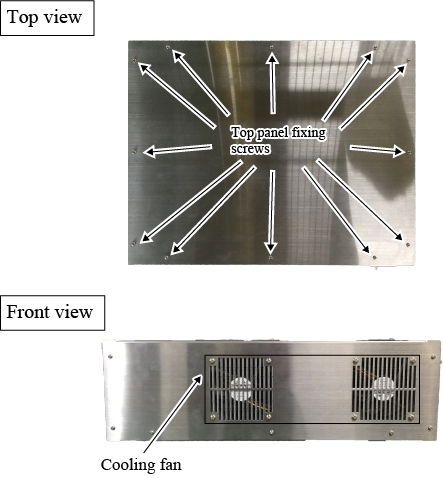
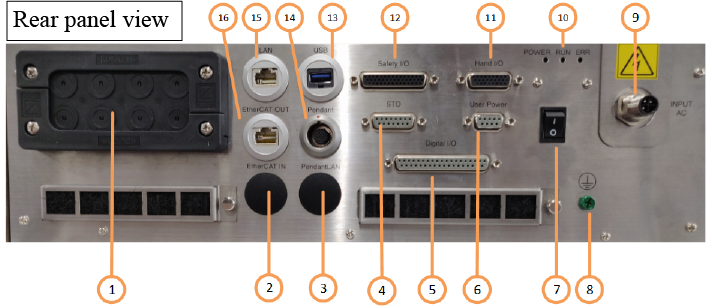
| No. | Name | Description |
|---|---|---|
| 1 | Cable multi-outlet plate | This opening is used to pull out any cable of controller-incorporated I/O expansion option device. |
| 2 | EtherCAT input connector |
To connect a customer-prepared IPC with an EtherCAT cable. (Only for IPC-less type) |
| 3 | Pedant LAN input connector |
To connect a LAN cable for pendant control of the customer-prepared IPC. (Only for IPC-less type) |
| 4 | STO connector | If you connect RC8 series robot controller to MC9, output the STO signal and Auto mode signal from this connector. |
| 5 | Digital I/O connector | To connect a signal line to perform I/O communication with an external device. |
| 6 | User Power connector | Use this connector when you use an Internal power source or an external power source. |
| 7 | Power switch | Main power switch |
| 8 | Earth connection terminal | To connect an earthing line. |
| 9 | AC power connector | Connection terminal for a power source connector. |
| 10 | Status display LED |
Each LED turns ON in the following conditions.
|
| 11 | Hand I/O connector | To connect a signal line for end-effector control. |
| 12 | Safety I/O connector | To connect a safety signal-related signal line. |
| 13 | USB connector |
Use this connector to update MC9 control IPC data. (Only for IPC-equipped type) |
| 14 | Pendant connector | To connect a pendant cable. |
| 15 | Ethernet connector |
Use this connector to communicate with MC9 control IPC. (Only for IPC-equipped type) |
| 16 | EtherCAT connector | To connect a control device on the slave side with an EtherCAT cable. |
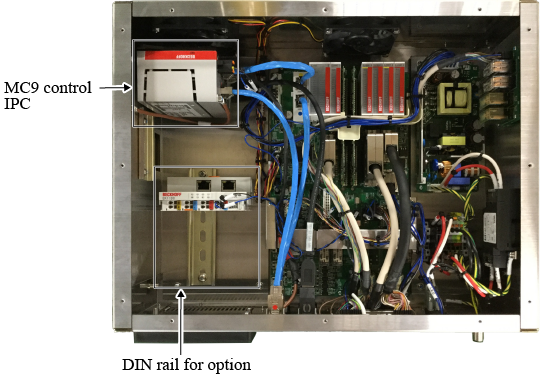
Inside
ID : 11024