
 HOME
HOME
ID : 11045
How to connect AC power cable
1
Set the power switch of the MC9 series controller to "Power-off".
2
Insert the AC power cable connector to the AC power connector of the MC9 series controller. When you insert the cable, match the pins of the AC power connector and the holes on the socket of the connector of the AC power cable. Make sure to insert the connector of the AC power cable into the end.
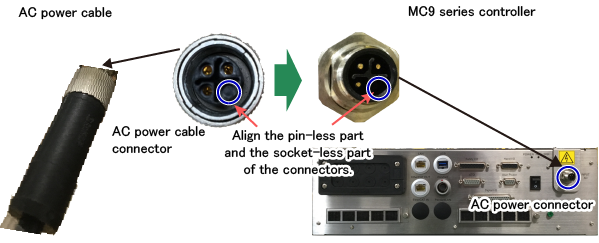
When connecting the power cable, make sure that the pins and holes of the socket match properly before inserting.
If you forcibly insert the cable while pins and socket holes are unmatched, the connector and the cable may get damaged.
3
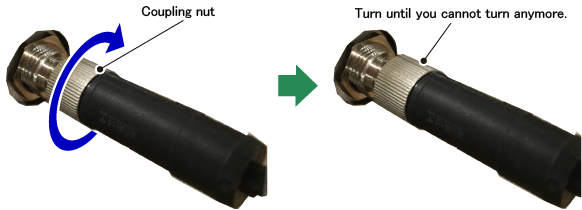
Viewing from the MC9 series controller, turn the coupling nut of the AC power cable to the right. Turn the nut until you cannot turn anymore. The connector is locked.
If the connector is not locked properly, connection might fail, leading to the abnormal MC9 series controller operation.
ID : 11045