
 HOME
HOME
ID : 11110
Quarterly Inspections
Check Items
Check the items listed in the table below every three months.
| No. | Check item | Controller status | How to check | Criterion | What to do |
|---|---|---|---|---|---|
| 2 | Cooling fan filter in MC9 series | OFF | Visually | No dust or dirt. | Clean the cooling fan filter. |
Clean the cooling fan filter in MC9 series
MC9 series has the intake port filter.
A clogged filter cannot cool the inside of MC9 series, which may result in malfunctions of internal electronic components due to heat.
Inspect and clean the filter periodically.
Follow the procedure described below to clean the filter.
1
Turn off the circuit breaker (main disconnecting switch) of MC9 series.
2
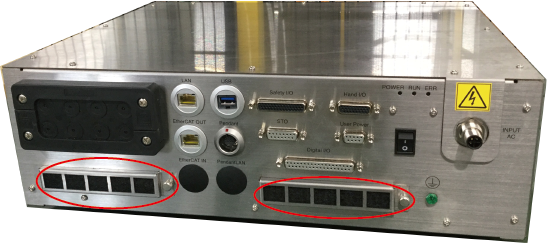
Remove the filter cover on the front panel of MC9 series.
The filter cover is fixed with a knurled screw and two detents. Make sure not to damage the detents.
3
Clean the filter with blowing air. Blow the air in the opposite direction of normal air flow.
Cleaning air must be de-humidified and de-oiled clean one.
Heavy stain of the filter should be washed by water or lukewarm water (40 degree or lower). Using neutral detergent may help further clean wash.
- Thoroughly dry the filter before assembling it.
- Replace the filter with new one when it does not become clean with air blow and water wash.
ID : 11110