
 HOME
HOME
ID : 11120
Connect the Hand I/O Cable
This section describes the procedure for connecting the Hand I/O cable to the robot controller.
Connection Procedure
1
Disconnect the connector from the Hand I/O connector on the backplane board inside the controller.
- The controller for VLA series robots comes with the motor & encoder cable connector attached when shipped from the factory.
Connect this connector to the Hand I/O connector if you do not use the Hand I/O cable. - Ensure that the disconnected connector does not touch the backplane board and other connectors.
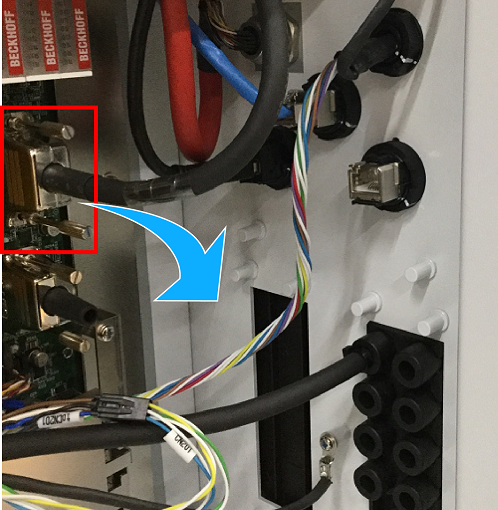
2
Pull the Hand I/O cable into the robot controller through the cable multi-outlet plate.
3
Connect the Hand I/O cable connector to the Hand I/O connector inside the robot controller.
This completes the Hand I/O cable connection.
ID : 11120