
 HOME
HOME
ID : 11150
How to Use the TwinCAT Motion Linkage Function
The TwinCAT Motion linkage function enables a PLC to issue a range of commands to the robot by using TwinCAT Component Object Model (TcCOM).
How to Add a TcCOM Module
Below is how to add a TcCOM module.
1
Register a license for the TwinCAT Motion linkage function on the RC9 robot controller, then restart the controller.
After a restart, receive [TwinCAT XAE] data from the controller through WINCAPSIII.
2
After receiving the data, save the project.
A module definition file, which has an extension of "xti", will be saved in [TwinCATData] in the project folder.
3
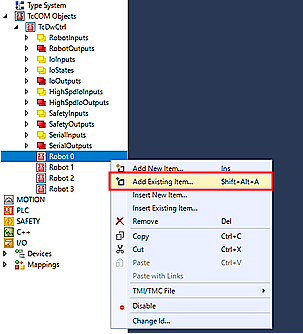
Import the module definition file to TwinCAT XAE Shell.
For the module "TcDwNcCtrl", right click [TcDwCtrl] and select [Insert Existing Item...].
For other modules, right click [Robot *] and select [Insert Existing Item...].
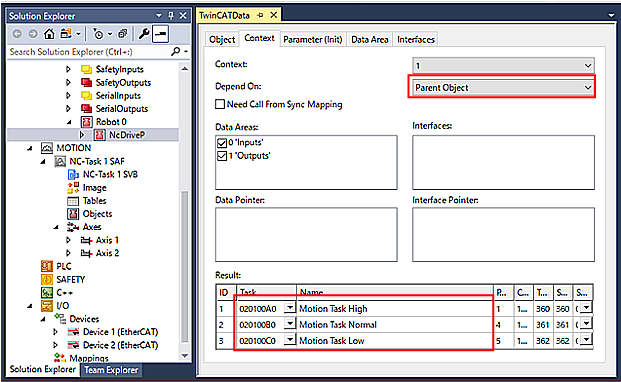
Context Setting
Set context as shown in the image below.
Apply this context setting to all modules.
ID : 11150