
 HOME
HOME
ID : 1100
I/O Information Display
Operation path : [F4 I/O] - [F6 Aux] - [F1 I/O Information]
Display CIFX board (DeviceNet slave board, CC-Link remote device board, etc.) information.
Press [F1 I/O Information] to display the following [I/O Information] window.
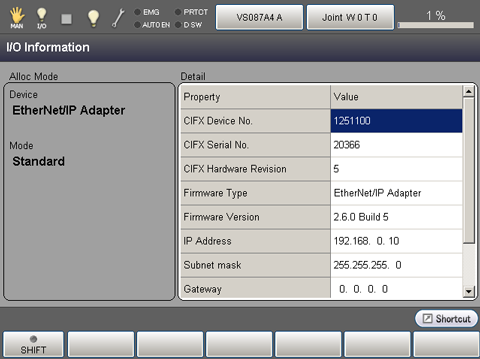
For details, refer to the table below.
| Descriptions | ||
|---|---|---|
| Alloc Mode | Device | Display Device name. |
| Mode | Display Alloc Mode. | |
| Detail | ||
| CIFX Device No. | Display CIFX Device No. | |
| CIFX Serial No. | Display CIFX Serial No. | |
| CIFX Hardware Revision | Display CIFX Hardware Revision. | |
| Firmware Type | Display Firmware Type. | |
| Firmware Version | Display Firmware Version. | |
| IP Address (*) | Display configured IP address. | |
| Subnet mask (*) | Display configured Subnet mask. | |
| Gateway (*) | Display configured Gateway. | |
| MAC Address (*) | Display MAC address. | |
| Node Address (*) | Display configured node address. | |
| Bit Rate (*) | Display configured communication speed. | |
| Name of Station (*) | Display configured station name. | |
| Type of Station (*) | Display configured station type. | |
* : Several types of CIFX boards can be displayed.
When I/O information acquisition fails, the following message will appear on the Detail section.
"Not have detailed information."
ID : 1100