
 HOME
HOME
ID : 1455
Project Property Setting
To use a DeviceNet slave board as an I/O expansion board, you need to register the following information from WINCAPSIII.
From the [Project] menu, point to [Property] to open the Property window, and then click .[I/O] tab. For details, refer to "Configuring a Project".
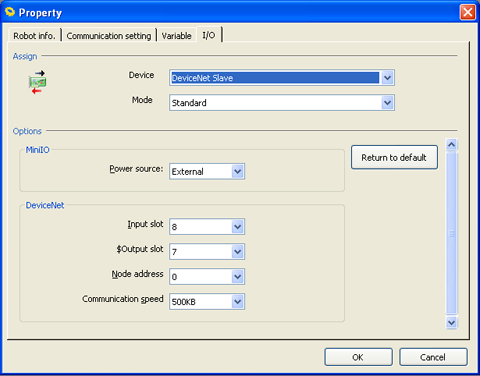
Assign
Device
| Setting value | |
|---|---|
| Device | "DeviceNet Slave" or "[Parallel] + [DeviceNet Slave]" |
Mode
"Standard" indicates the Standard mode, and "Compatible" indicates the RC3 Compatible mode. For details about allocation modes, refer to “Functions in Individual Allocation Modes ”.
| Setting value | |
|---|---|
| Mode | "Compatible" or "Standard" |
Options MiniIO
Power Source
If the total maximum capacity of Mini I/O, Hand I/O and Parallel I/O is 1.3 A or lower, the internal power source is available.
| Setting value | Defalt setting | |
|---|---|---|
| Power source | "External" or "Internal" | External |
Options DeviceNet
Input / Output Sots
For about the number of IO slot, refer to “Quick Reference Table for the Number of Input/Output Slots". I/O can be added or removed by one byte; this will determine the maximum number of I/O.
| Available range | Default Setting | |
|---|---|---|
| Input slot | 5 to 32 (byte) | 8 (byte) |
| Output slot | 4 to 32 (byte) | 7 (byte) |
Node Address
| Available range | Default Setting | |
|---|---|---|
| Node address | 0 to 63 | 0 |
Communication Speed
| Available range | Default Setting | |
|---|---|---|
| Communication Speed | "125KB", "250KB" or "500KB" | 500KB |
ID : 1455
- Related Information
- Quick Reference Table for the Number of Input/Output Slots
- I/O Allocation