
 HOME
HOME
ID : 1719
Displaying Program List Window (Automatic Mode)
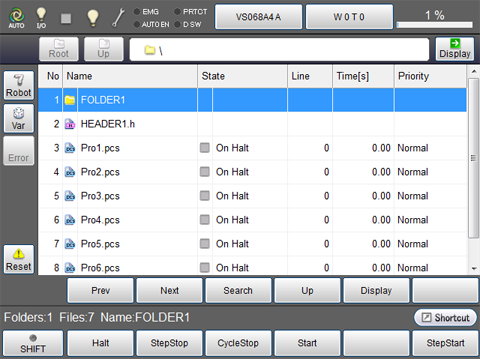
Press [F1 Program] on the basic screen of automatic mode to display the following program list window.
| Keys other than function keys | |
|---|---|
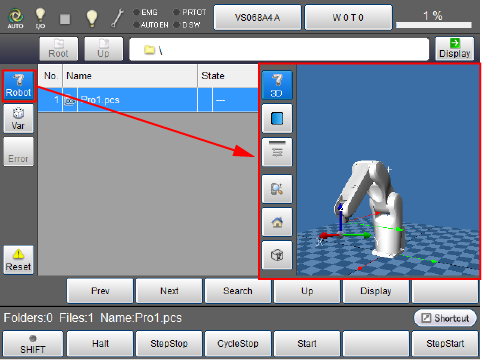
| Robot | Display 3D image of the robot during the machine lock. For information about operation keys, refer to " Displaying Current Position Information and 3D Image of Robot ". Button turns blue while robot button is pressed. |
| Var | Display a static variable monitoring window. |
| Error | Display syntax error log information. |
| Reset | Reset the selected program or reset all programs. |
| Root | Move to root of folder. |
| Up | Move to the folder hierarchy that is one higher than the current one. |
| Path | Enter the file path on the displayed file path input screen, and press [OK] to move to the specified file path. |
| Display | Display contents of the selected folder and file. |
| Prev | Move to the previous page of the currently displayed program list. |
| Next | Move to the next page of the currently displayed program list. |
| Search | Enter the file name on the displayed file name search screen, and press [OK] to search the entered file name. |
| Up | Move to the folder hierarchy that is one higher than the current one. |
| Display | Display contents of the selected folder and file. |
| Available function keys | |
|---|---|
| [F1 Halt] | Halt the program being executed. |
| [F2 StepStop] | Execute step stop of the program being executed. |
| [F3 CycleStop] | Execute cycle stop of the program being executed. |
| [F4 Start] | Execute single-cycle start or continuous start of the selected program. |
| [F6 StepStart] |
Execute step feed start of the selected program. Step In and Step Over are available. What's Step In : Run into the procedure called from current program. What's Step Over : Run over the procedure called from current program. |
| [F7 Reset] | Reset the selected program or reset all programs. |
| [F9 Priority] | Set priority of program (low to high). |
| [F10 Continue Start] | Execute continue start of all programs that are under suspension. |
| [F11 Display] | Display contents of the selected folder and file. |
ID : 1719
- Related Information
- Displaying Folder or Contents of the File