
 HOME
HOME
ID : 1731
Displaying Current Position Information and 3D Image of Robot
Operation path : Basic screen - [F2 Arm]
Displays the current position information of robot.
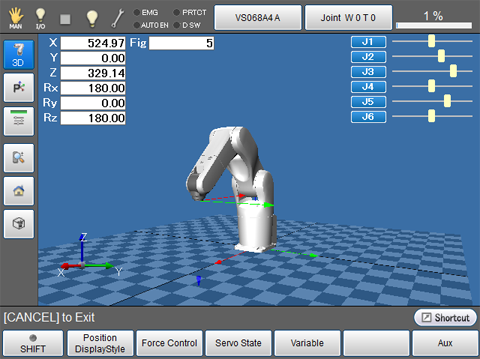
| Keys other than function keys | |
|---|---|

|
Displays 3D image of the robot during the machine lock. |

|
Changes the displaying method for the current position information of robot. |

|
Displays position information of each joint in bar. |

|
Specifies the rotational direction for changing the display direction of 3D image by using jog dial. |

|
Changes the 3D image viewpoint. |

|
Changes the 3D image viewpoint. Switches the view so that the entire robot can be observed. (Ver.1.8.* or higher.) |
| Available function keys | |
|---|---|
| [F1 Position Display Style] |
Changes the displaying method for the current position information of robot. |
| [F2 Force Control] | Sets the Force control (compliance function). |
| [F3 Servo State] |
Displays servo state of each joint. Also allows you to acquire control log and servo log, and displays the estimated load factor for each Joint. |
| [F4 Variable] | Displays [Variable screen]. |
| [F6 Aux] |
Displays [Auxiliary Functions - Arm] window. |
| [F7 Origin return] | Confirms and changes the settings for the Home Position Guidance function. |
| [F12 Maintenance] | Displays the menu associated with settings for each joint. |
ID : 1731