
 HOME
HOME
ID : 5078
Variable Monitoring Function within the Program
Display variable monitoring window within the program.
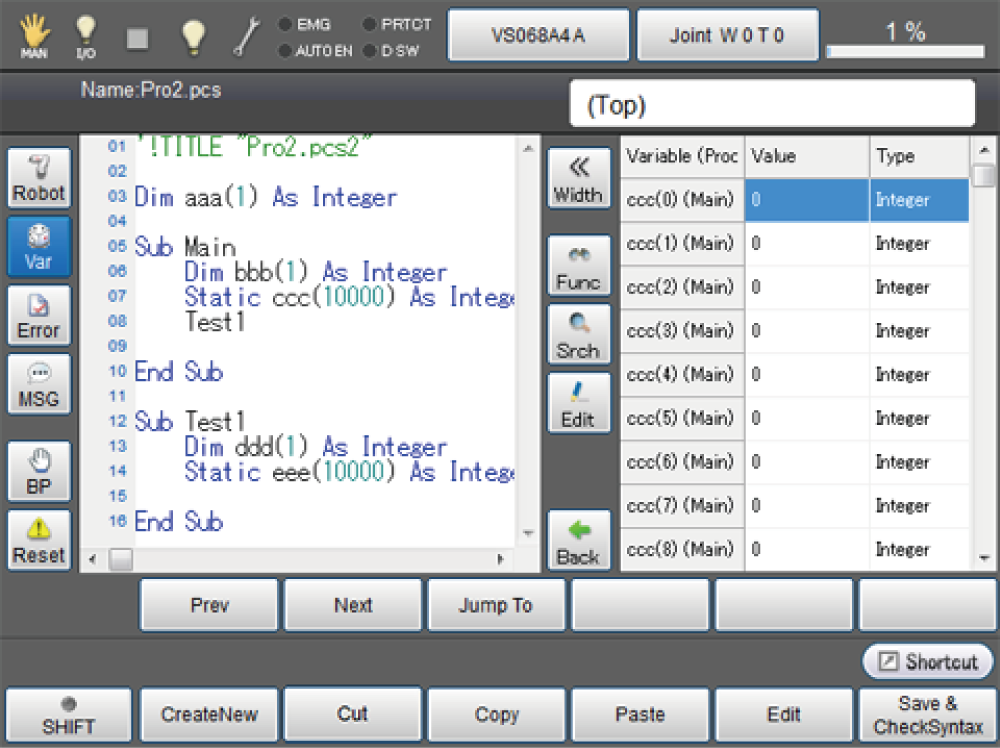
For details of operation, refer to the "Operation Using the Teach Pendant " of START UP MANUAL.
| Keys other than function keys | ||
|---|---|---|
| Var | Display a variable monitoring window. | |
| Width | Switch the width of the variable monitoring display between two types. | |
|
Func Line All |
Switch the display style of variable window within the program. |
|
| Func | Display all the variables available within the procedure. (except for global variables) | |
| Line | Display variables used in current line. This displays global and local variables. | |
| All | Display all the static variables. | |
| Srch | Search variable names. | |
| Edit |
Edit variables. If an array is displayed, elements of arrays are displayed by clicking this button. For details about Variant array, refer to "Monitoring Variant array". |
|
| Back |
This button appears during array elements are displayed. Go to immediately above the current layer. |
|
ID : 5078
- Related Information
- In-program Variable Edit Funciton
- Monitoring Variant Array