
 HOME
HOME
ID : 5781
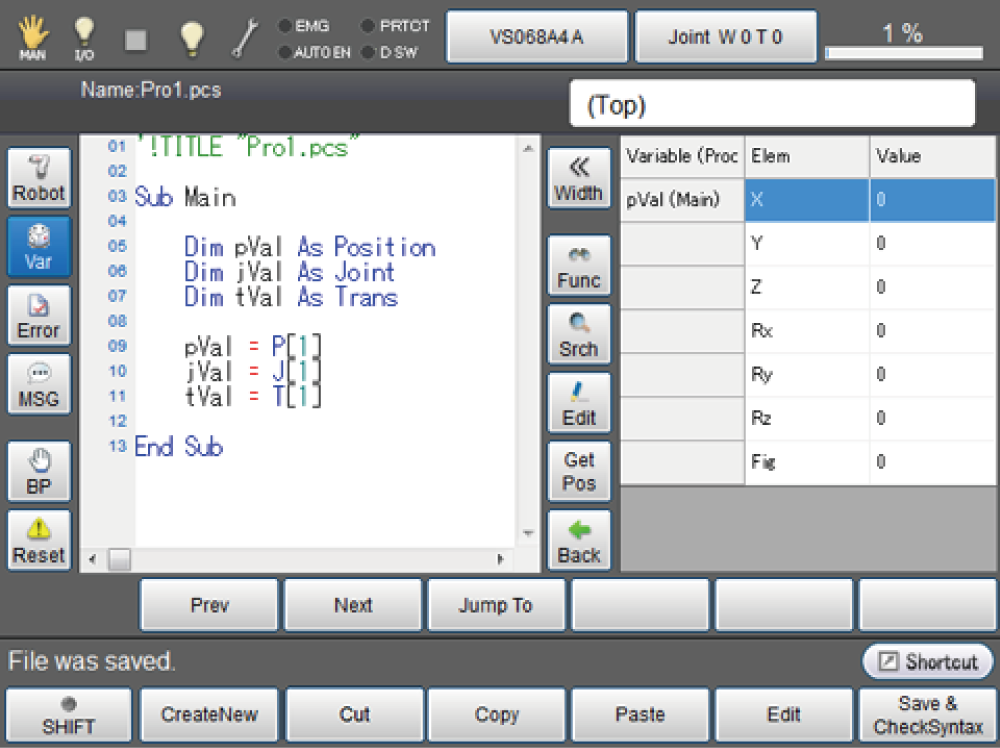
In-program Variable Edit Funciton
The following image shows the In-program variable edit function window.
| Keys other than function keys | ||
|---|---|---|
| Width | Change the width of Variable edit window between two types. | |
|
Func Line All |
Switch the display style of variable window within the program. Back to the variable monitoring window. |
|
| Func | Display all the variables available within the procedure. (except for global variables) | |
| Line | Display variables used in current line. This displays global and local variables. | |
| All | Display all the static variables. | |
| Srch | Search is not available. | |
| Edit |
Edit variables. Once the numeric keypad is displayed, enter values and then press [OK]. To cancel editing, press [Cancel]. Entered values are discarded. |
|
| Get Pos |
Register the current position to P-, J-, and T-type static variables. Once this button is pressed, a confirmation window for data reading is displayed. Press [OK] to read data. To cancel data reading, press [Cancel]. This button is displayed only when the current position can be registered in variables. |
|
| Back |
Back to the variable monitoring window. |
|
ID : 5781