
 HOME
HOME
Display Setting for Pendant
Operation path : [F6 Setting] - [F3 Pendant and Panel] - [F2 Pendant Setting]
Set character size and font to display on the pendant screen.
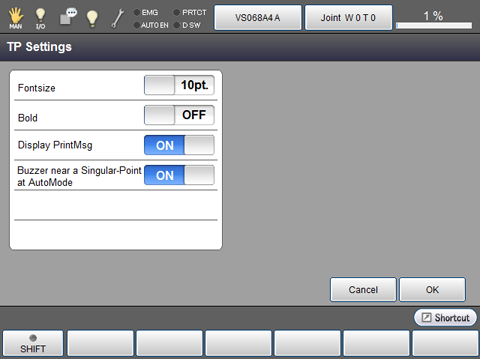
Press [F2 Pendant Setting] to display the following [TP Settings] window.
The setting can be changed by directly touching ON/OFF characters (point size character for font size) of each item.
Change each setting, and press [OK] in [TP Settings] window to confirm the changed setting.
| Keys other than function keys | |
|---|---|
| Fontsize | Select the display font size of the teach pendant (10point or 12 point). |
| Bold | ON state makes the display font style bold. |
| Display PrintMsg | Display or hide the dialog at the PrtMsg command execution. (Display: ON, Hide: OFF) |
| Buzzer near a Singular-Point at AutoMode | Turn ON (sound) or OFF (mute) the beep sound which sounds when the robot passes through the vicinity of the singular point in Auto mode. In the Manual mode or the Teach check mode, beep sound is always ON regardless of this setting. |