
 HOME
HOME
Displaying and Changing Data Communication Settings Screen (For Ethernet Selection)
Operation path : [F6 Setting] - [F5 Communication and Token] - [F3 Data Communication] - [Select Ethernet for Device]
Change data communication setting for Ethernet device.
Select Ethernet for device, and press [F5 Edit] to display the following [Data Communication Settings] window.
The currently selected item will be highlighted. This setting item can be selected by directly touching the screen.
Select the item to change in each item, and press [OK] in [Data Communication Settings] window to confirm the changed setting.
When "Client" is selected
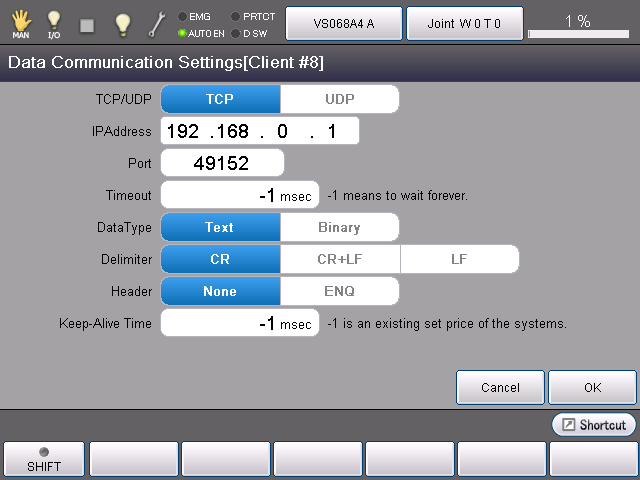
| Item | Description |
|---|---|
| TCP/UDP | Specify a communication protocol. Select TCP or UDP. |
| IP Address | Specify server's IP address. |
| Port | Specify server's Port number. |
| Timeout | Specify the time-out period that limits the allowable waiting time of the server response by milliseconds. This should be "infinite waiting" if "-1" is set. |
| DataType | Select Text or Binary. |
| Delimiter | When DataType is Text, specify a delimiter sign which delimits communication text. Choose one from "CR(0x0D)", "CR+LF"(0x0D 0x0A)" or "LF(0x0A)". |
| Header | When DataType is Binary, specify a header for communication.Choose "None" or "ENQ"(0x05). |
| Keep-Alive Time | Specify the time to periodically send a signal to check the connection to the communication device. This should be the system specified value if "-1" is set. |
When "Server" is selected
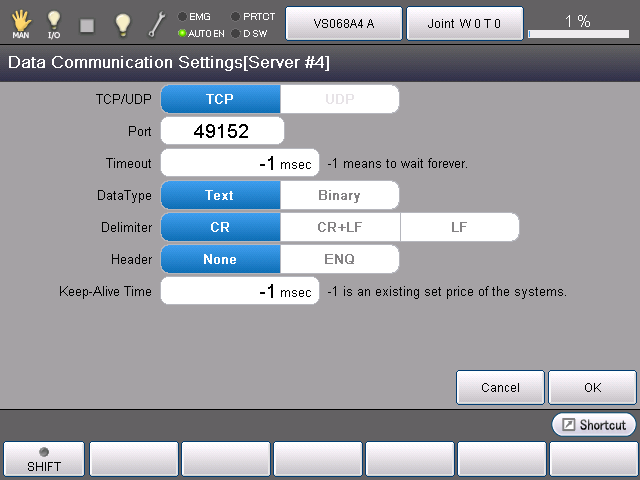
In the Server-line, there is no settings for server's IP address and port.
For TCP/UDP selection, only TCP is selectable.
For other items, refer to "When Client is selected".