
 HOME
HOME
Arm Menu
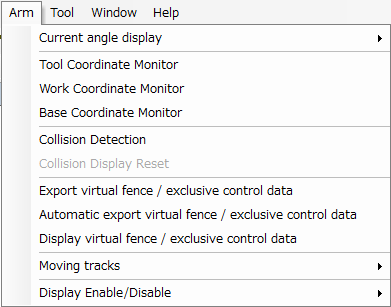
Description of the Drop-down Menu
Current Angle Display
This submenu controls the display, in the [Arm 3D View] window, of current values for arm angle variables of types P, J, T, and J-EX. It also supports copying of those values.
Tool Coordinate Monitor
This toggles the display of the current tool number and coordinate axis in the [Arm 3D View] window.
Work Coordinate Monitor
This toggles the display of the current work number and coordinate axis in the [Arm 3D View] window.
Base Coordinate Monitor
This toggles the display of the current base coordinate axis in the [Arm 3D View] window.
This function is available in RC8 Ver.1.12.* or higher.
Collision Detection
Selecting this toggles collision detection.
Collision Display Reset
This removes collision results from the display.
Export virtual fence / exclusive control data
This exports virtual fence data or exclusive control data to the project folder.
This function is available in RC8 Ver.1.12.* or higher.
Automatic export virtual fence / exclusive control data
This automatically exports virtual fence data or exclusive control data on saving the project and sending the data to RC8.
This function is available in RC8 Ver.1.12.* or higher.
Display virtual fence/exclusive control data
This displays virtual fence data or exclusive control data on the arm 3D screen.
This function is available in RC8 Ver.1.12.* or higher.
Moving Record
Set the display of the trajectory the robot moved through.
Display Enable/Disable
This submenu controls display of elements in the Arm 3D view window: floor, arm, tool, work, area, and obstacles.