
 HOME
HOME
ID : 5470
Monitoring Function of the Force Sensor Values
When the compliance function with force sensor is enabled, the monitoring of the feedback value from the force sensor currently used is available.
From the top screen, press [F2: Arm]-[F2 Force Control].
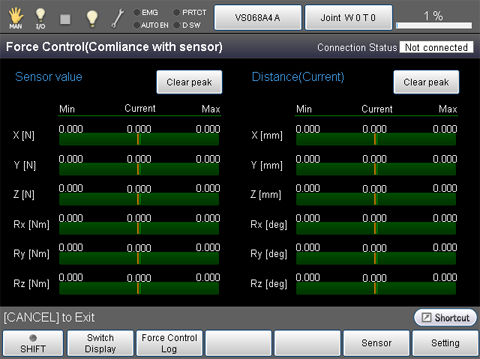
| Function key | Function |
|---|---|
| [F1 Switch Display] | Switch between the compliance function with force sensor and the compliance function |
| [F2 Force Control Log] | Force control log |
| [F5 Sensor] | Sensor |
| [F6 Setting] | Force control setting |
| [F12 Detail setting] | Force control detail setting |
Values displayed in the monitor could differ from the values detected by the force sensor. This is because the displayed values of the force control log or the sensor have been compensated. Therefore, although the detected values actually do not exceed the values you have specified, the displayed value could exceed the value specified, or, conversely, although the displayed values actually do not exceed the values you have specified, the detected value could exceed the value specified.
ID : 5470