
 HOME
HOME
ID : 9638
Error Display
When an error occurs in the controller during robot operation/running, the Smart TP displays an error code and the error content that are described in the "Error Code".
Reset the error by pressing OK button on the error message window after processing the error.
The reset of all programs can be also processed on the error message window.
- "Pressing OK button on the error message window" and "reset of all programs" are available with an account that the user level is "Programmer" or higher.
- When pressing the [Close] button on the message window, you can close the window and continue operation. The same error will not be displayed until re-login.
If you want to clear the error, press the [Error Clear] button of the [Shortcut] button. - [Reset All], [Error Clear] of the [Shortcut] button and the [Clear] button of STO are available with an account that the user level is "Programmer" or higher.
The display example of error message window is shown in the figure below.
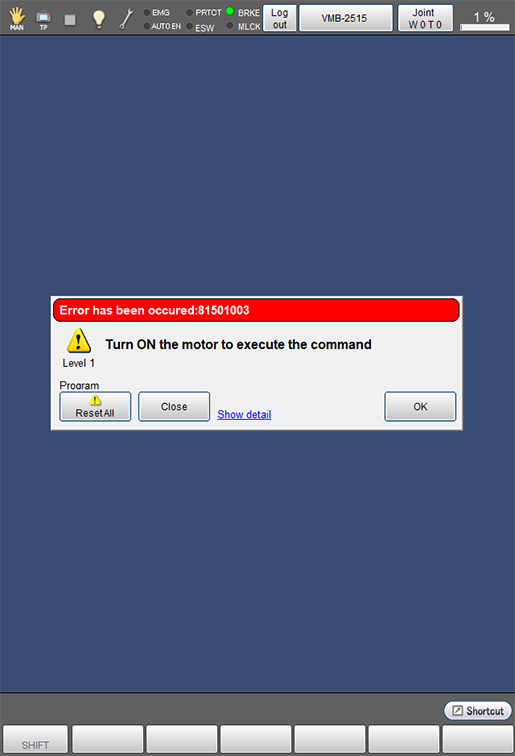
Press [Show detail] shown in blue on the error message window to check the detail information on error and the method to recover error.
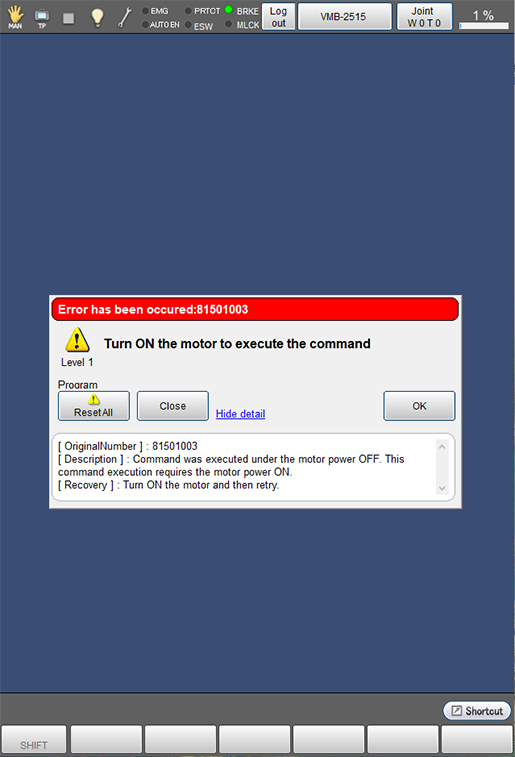
[Show detail] shown in blue will be changed to [Hide detail] if pressed. Conversely, press [Hide detail] to hide the detail information.
The display example of detailed contents is shown in the figure below.
ID : 9638