
 HOME
HOME
ID : 9652
Switching Between Operation Modes
This section describes how to change the operation mode.
1
Tap the leftmost icon on the status bar.

2
Select the operation mode.
To change to the auto mode, select [Auto mode options] as well.
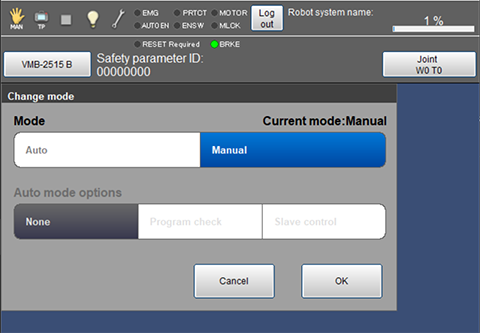
3
Press [OK].
4
If you change the operation mode for the first time from the login, you need to enter the login password.
Enter the login password, and tap [OK].
The operation mode will be changed.
An icon of selected mode is displayed in the status bar.
| Icon | Operation mode |
|---|---|
 |
Auto mode |
 |
Manual mode |
ID : 9652
- Related Information
- Manual Mode
- Automatic Mode
- Simulation with Smart TP