
 HOME
HOME
ID : 9887
Record the Motion Log
Origin return guidance function generates a trajectory so that the robot does not interfere with peripheral devices, referring to the motion log during automatic operation. Therefore, before you execute the origin return, you need to start the recording of the motion log.
Start the recording of the motion log by PacScript dedicated command "StartBackTraceLog". Also, stop the recording of the motion log by "StopBackTraceLog".
StartBackTraceLog
Delete data stored in the dedicated ring buffer of the origin return guidance function, start the recording of the motion log.
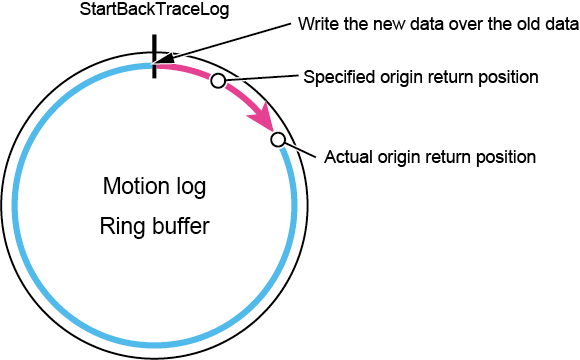
The available recording time is 10 minutes. Once 10 minutes elapse, it will be overwritten from the oldest record.
The dedicated ring buffer is used. Therefore, this command can be used together with other log functions such as the control log at the same time.
For details of the command, refer to "StartBackTraceLog" of Command Reference.
When the Log Exceeds Buffer Size
If it exceeds the upper limit of the available recording time of the motion log, it will be overwritten from the oldest record.
In some cases, the motion log to the specified origin return position may be deleted in the middle. In that case, the actual origin return position is the oldest record point among the motion log to the specified origin return position.
StopBackTraceLog
Stop the recording of the motion log.
For details of the command, refer to "StopBackTraceLog" of Command Reference.
ID : 9887