
 HOME
HOME
ID : 9888
Start the Origin Return
Before the origin return is executed, generate a trajectory of the origin return based on the specified origin and the recorded motion log. After the trajectory is generated, the origin return can be executed.
To use the origin return, be sure to reduce to the speed that the robot can stop safely.
The trajectory generation and the origin return can be performed by PacScript dedicated commands or smart TP.
If the trajectory is generated by dedicated commands, execute the origin return by dedicated commands. If the trajectory is generated by the smart TP, execute the origin return by the smart TP. The origin return cannot be executed by using the trajectories generated in the different way.
Using Dedicated Commands
Dedicated commands can be used in Auto mode.
f you use dedicated commands, the trajectory of the origin return can be calculated only one time per a log acquisition.
If you want to return the robot to the other origin after the trajectory calculation by dedicated commands, use the smart TP.
CalcBackTraceLog
Specify the origin that you want to return when the command is executed.
This is a command to calculate a path based on the specified origin and the recorded motion log, and to generate the trajectory of the origin return.
For details of the command, refer to "CalcBackTraceLog" of Command Reference.
MoveBackTraceLog
This is a command to return the robot to the origin by the generated trajectory.
If the trajectory of the origin return is not generated before executing the command, an error will occur.
For details of the command, refer to "MoveBackTraceLog" of Command Reference.
Using the Smart TP
Operation by the smart TP can be used in Manual mode and Auto mode (when the program check option is selected).
Operation path: [F2 Arm] - [F7 Origin return] - [F1 Calculate course]
1
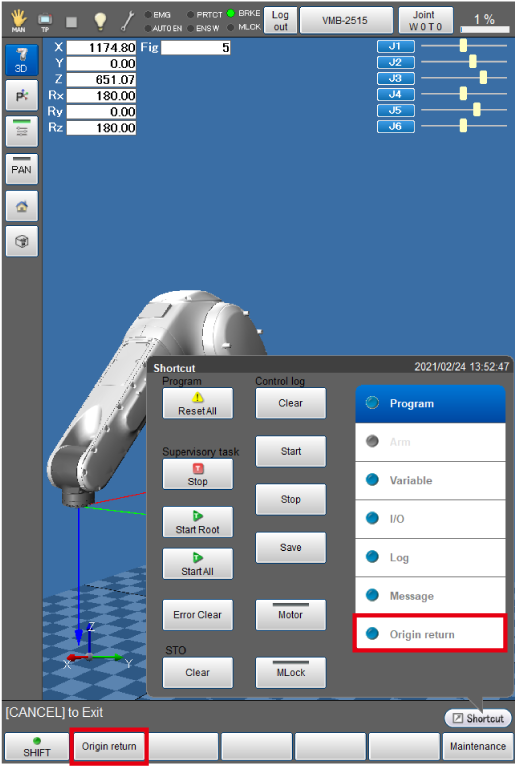
Press [F7 Origin return] in the Arm window, or press [Origin return] of the shortcut menu.
2
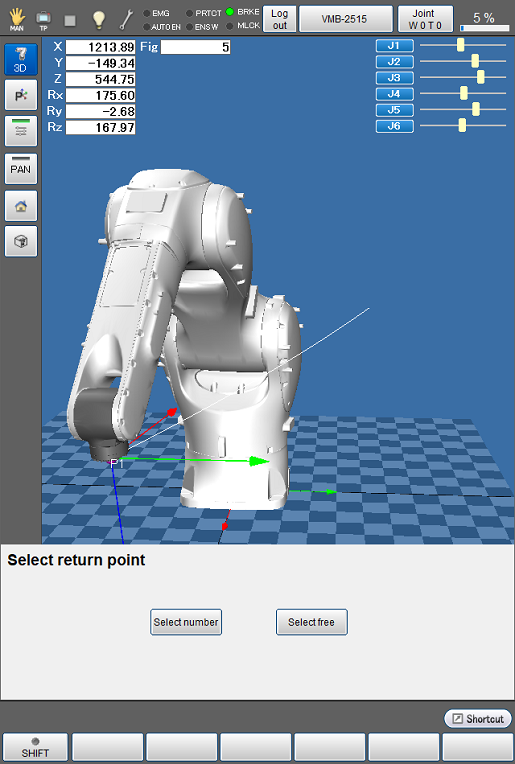
Specify the return position by the following choices.
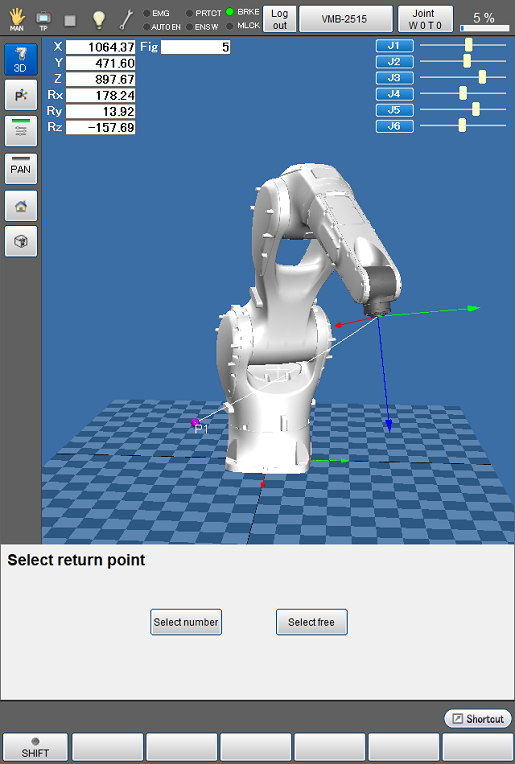
| Choices | Description |
|---|---|
| Select number | Specify the return position from the origin number. -1: Origin recorded at the last by SetVirtualTracePos 0 cannot be specified. |
| Select free | Use the slider to specify the return position. Sky blue point on the trajectory is the return position. |
3
Trajectory of the origin return is generated.
If the recorded robot operation time is longer, the calculation of the trajectory of the origin return takes more time.
If the last position of the motion log of the origin return is different from the robot current position, the trajectory will be generated with the starting point that displacement distance of 4 to 6 axes is low and the distance is the shortest among points on the trajectory of the origin return.
4
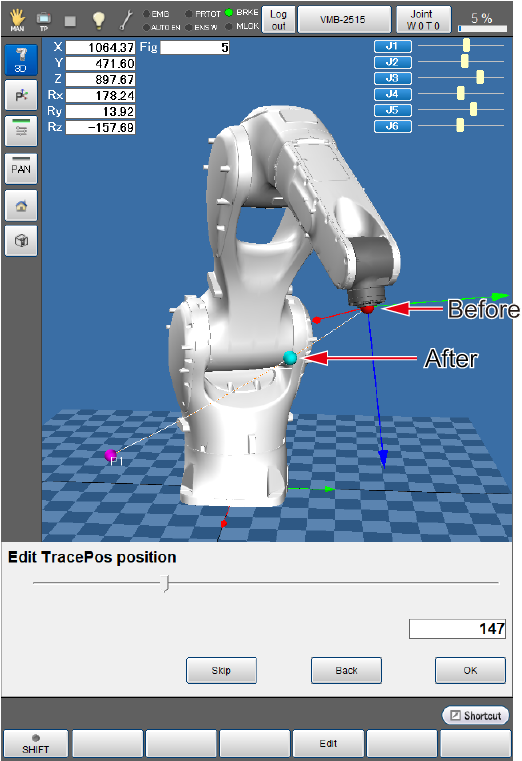
The slider to select the start position of the origin return is displayed. You can use the slider to change the start position of the origin return.
Red point on the trajectory is the start position of the origin return before the change.
Sky blue point on the trajectory is the start position of the origin return after the change.
This setting can be skipped.
If the start position of the origin return is changed, when the origin return is executed, the robot moves under PTP control from the current stop position to the start position of the origin return. After the robot reached at the start position of the origin return, it moves on the generated trajectory.
Trajectory from the current robot stop position to the changed start position of the origin return is not generated based on the motion log. Therefore, interference with peripheral devices is not guaranteed.
5
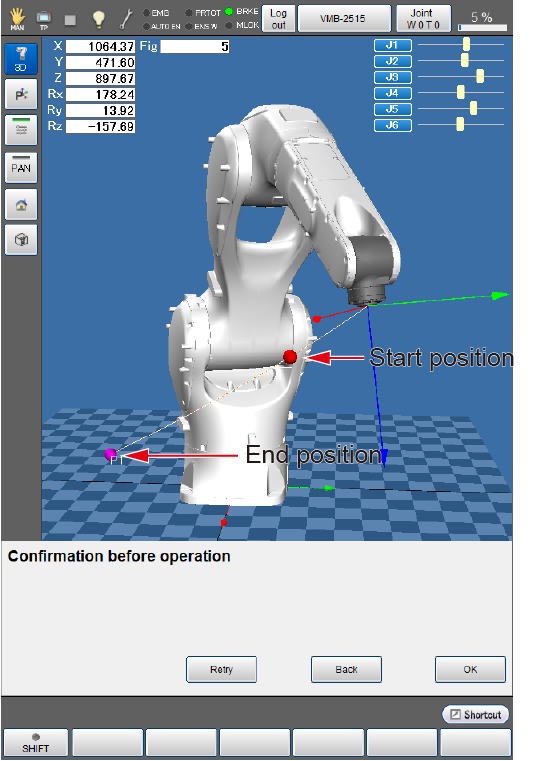
Check before executing the origin return.
Red point on the trajectory is the start position of the origin return.
Pink point is the end position of the origin return.
6
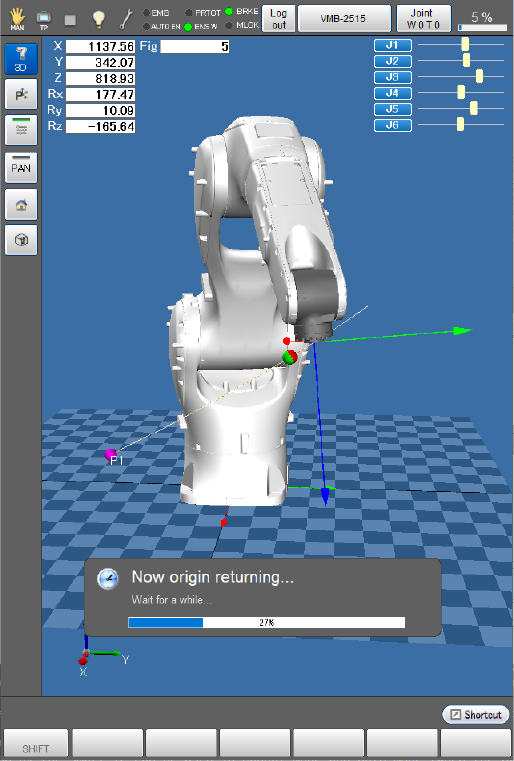
While pressing the enabling switch correctly, when keeping pressing [OK] button, the origin return is executed.
7
When the origin return is completed, it returns to the window of selecting return point.
ID : 9888