
 HOME
HOME
ID : 9924
Turning the Motor ON
Turning the motor on enables you to run the robot.
Before turning the motor on, be sure to confirm no person(s) is in the
restricted space of the robot.
To perform the following operation, it is necessary to turn on motor.
- When you manually operate the robot under the manual mode.
- When you run the robot automatically in the auto mode.
Operation of Mini-Pendant
To turn ON the motor, do the following procedure.
| Mode | Operation |
|---|---|
|
|
| Automatic mode | Press the [MOTOR] key. |
Under the manual mode, motor power turns on only when the enabling switch is pressed. Motor power turns off once the enabling switch is released.
In Auto mode (when the program check option is selected), when the enabling switch is turned off, the robot in operation stops immediately but the motor power does not turn off.
[MOTOR] Key
Once the motor power turns on, the LED of [MOTOR] key lights up.
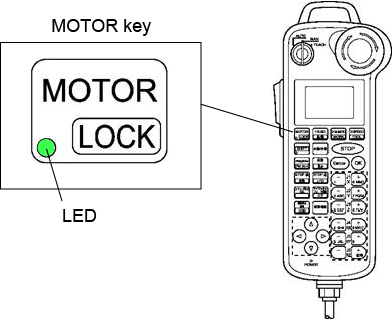
- Motor cannot be turned on in the "machine lock" state.
- If turn off the motor immediately after turning the motor on, "MotorBUS-FET failure" might occur. If an error occurs, reboot the controller power supply.
ID : 9924