
 HOME
HOME
ID : 9944
Turning the Robot Controller ON/OFF
For VMB and VLA Robots
The robot controller supplies the robot unit with power and controls it.To operate the robot, you need to turn on the robot controller.
For safety, turn off the controller before connecting the robot and the controller, replacing parts, or performing internal checks.
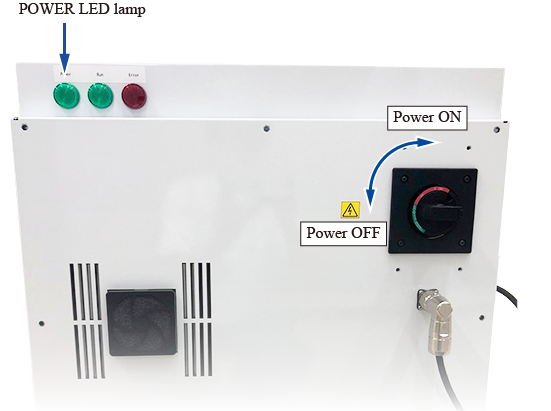
To turn on/off the robot, operate the circuit breaker (main disconnecting switch) of the robot controller shown in the figure below.
- Turn it to ON side (clockwise) : turns on
- Turn it to OFF side (anti-clockwise) : turns off
When the robot is on, the POWER LED lamp (the leftmost of the three pilot lamps) in the figure below keeps coming on. When it is turned off, the pilot lamp goes out.
If the motor is on, turn it off before turning off the robot controller.
If you want to turn the robot controller on again immediately after turning it off, "wait one minute or more" after the POWER LED lamp on the robot controller completely goes out.
Be sure to turn the robot controller off before connecting or disconnecting the robot control cable between the robot unit and its controller. Connection/disconnection of the robot control cable while the robot controller power is on will damage the robot controller.
Note that when the power is turned off, the fan will stop once but rotate again for a few seconds immediately afterwards.
For MC9 Series
MC9 series controls the motor and the RC8 series controller. To operate the motor and the RC8 series controller, you need to turn on MC9 series.
For safety, turn off MC9 series before wiring MC9 series, replacing its parts, or performing internal checks.
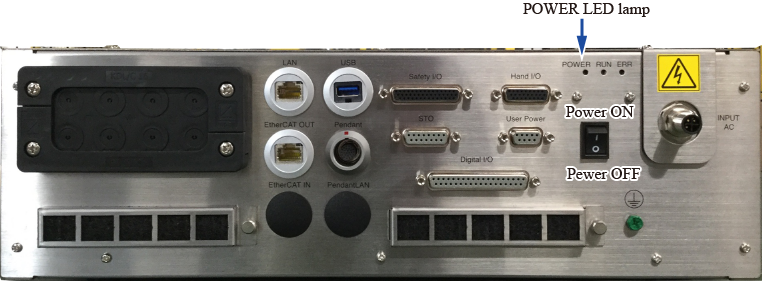
To turn on/off MC9 series, operate the power switch of MC9 series shown in the figure below.
- Press the upper side (“I” side): turns on
- Press the lower side (“O” side): turns off
When MC9 series is on, the POWER LED lamp (the leftmost of the three status display LEDs) in the figure below keeps coming on. When MC9 series is turned off, the POWER LED lamp goes out.
If the motor is on, turn it off before turning off MC9 series.
If you want to turn on MC9 series again immediately after turning it off, “wait one minute or more” after the POWER LED lamp on MC9 series completely goes out.
Note that when the power is turned off, the fan will stop once but rotate again for a few seconds immediately afterwards.
ID : 9944