
 HOME
HOME
ID : 10138
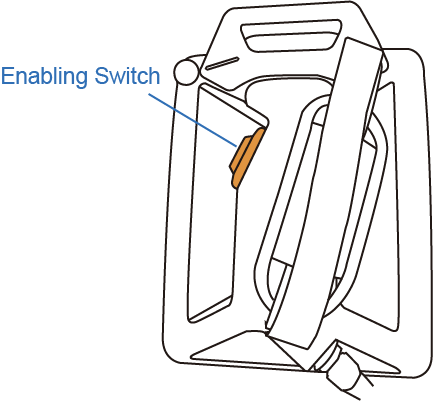
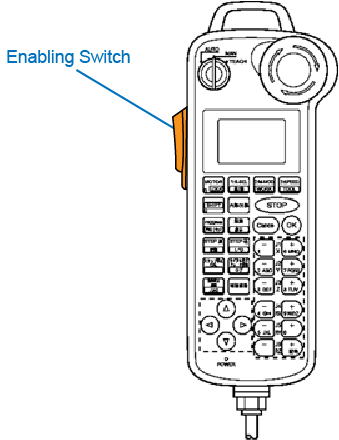
Enabling Switch
The enabling switch is provided to stop the robot automatically and safely when the operator can no longer operate the robot correctly due to unforeseen circumstances such as the operator suffering a blackout or dying while running the robot manually with the smart TP or mini-pendant. If a situation such as this arises, the strength with which the operator is pressing the enabling switch will either decrease or increase markedly. The enabling switch is a 3-position switch which is able to recognize and react to the following 3 operating statuses.
| Position | Switch |
|---|---|
| When the switch is not being pressed or being pressed lightly | OFF |
| When the switch is being pressed with correct pressure | ON |
| When the switch is being pressed too strongly | OFF |
If the switch is off or goes off, the robot cannot run or the running robot will stop, respectively. Also, the enabling switch is need to be pressed when turning motor on or starting-up programs.
In manual mode, motor turns off when the enabling switch is released.
In manual mode, motor turns on when the enabling switch is pressed.
In order to keep the motor off while the enabling switch is pressed, go to [F6 Setting] - [F3 Pendant and Panel] - [F7 ESW interlock] then select the motor off.
 |
 |
In Manual mode or Auto mode (when the program check option is selected), if you perform any of the following operations, you need to press the enabling switch correctly.
- When pressing any of the arm traverse keys.
- When performing Cycle-start or Step-start.
- When turning on the motor power.
Never keep the enabling switch held down with adhesive tape or the like. Doing so may fail to stop the robot when running it in the Manual mode. It is extremely DANGEROUS.
ID : 10138