
 HOME
HOME
ID : 9955
Program Priority Mode
This mode increases the program processing speed by keeping a certain display of the Mini-pendant.
Operation Path
[AUX] - [Option] - [ProPriMode]
Operation
Setting of the Program Priority Mode
1
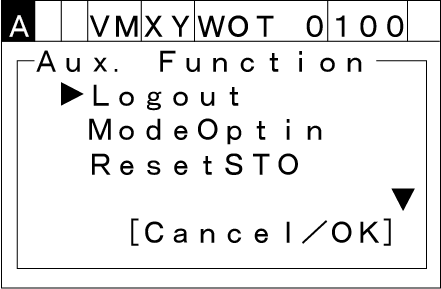
Pressing [Aux] under the Auto-mode will display the [Aux. Function] window.
2
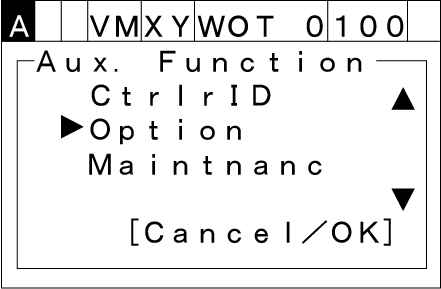
Choose [Option] with the up and down cursor keys and then press [OK].
3
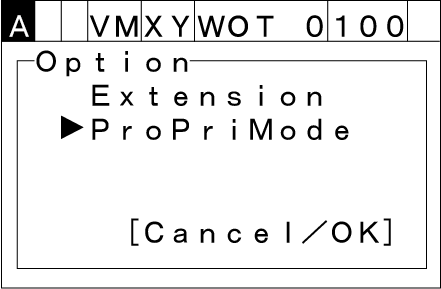
Choose [ProPriMode] and then press [OK].
The program priority mode starts.
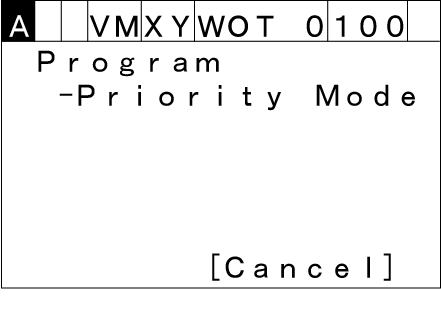
Available keys and a button under the program priority mode are Emergency stop, STOP, Cancel, MOTOR, and LOCK keys.
Releasing the Program Priority Mode
There are the following two ways to release the program priority mode.
- Pressing the Cancel key or the Cancel button on the display.
- Switching to the manual mode from the auto mode.
If the program priority mode is released during program processing, an error [81201001 Watchdog time over] might be issued.
ID : 9955