
 HOME
HOME
ID : 9957
Setting the next Battery Replacement Date
Operation Path
[Aux] - [Maintenance] - [Ctrlr Batt]/[Encdr Batt]
Operation
Set the next replacement date of the internal clock battery and encoder battery of the robot controller.
When the replacement day comes, appears on the screen periodically.
1
Press [AUX] to display [Aux. function].
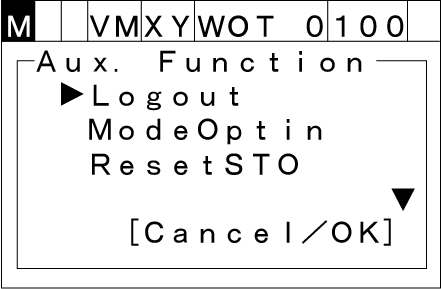
2
Select [Maintnanc] with the up and down arrow keys then press [OK].
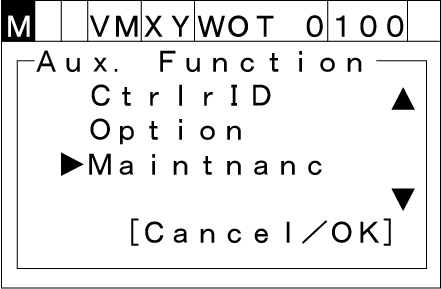
3
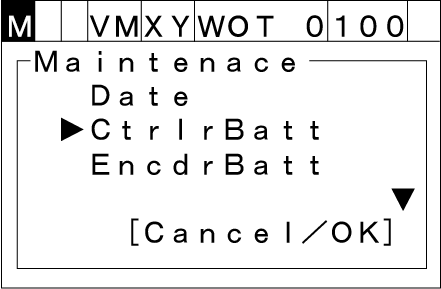
Select [CtrlrBatt] or [EncdrBatt] then press [OK].
You can set the next replacement date of the controller battery for the internal clock by [CtrlrBatt], the next replacement date of the encoder battery by [EncdrBatt].
4
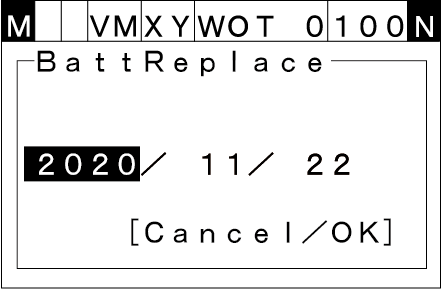
The next replacement date setting window will appear.
Select an item to be set with the left and right cursor keys, enter the target value with the numeric keypad.
Press the [OK] key to establish the new setting.
Normally, the replacement cycle of the controller battery (for the internal clock) is every 10 years, and the encoder battery is every 2 years. (refer to the Installation & Maintenance guide)
After replacing each batteries, set the next battery replacement date from the controller.
When replacing the controller battery (for the internal clock), set 10 years later from the current time of the controller.
When replacing the encoder battery, set 2years later from the current time of the controller.
ID : 9957