
 HOME
HOME
ID : 10564
How to Close the Front Panel
1
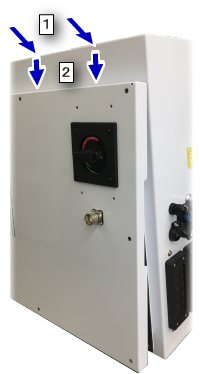
Install the front panel to the robot controller.
- From the slightly upside of the upper opening of the robot controller, tilt the front panel and install.
- Move the front panel downward smoothly. Be sure not to catch the wirings inside of the robot controller.
2
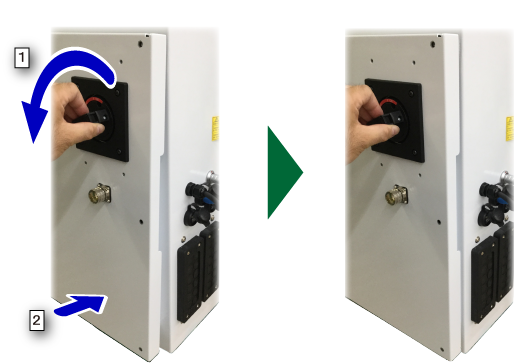
- Turn the circuit breaker (main disconnecting switch) anti-clockwise to the end and keep it.
- Slightly push the bottom of the front panel, and then release the circuit breaker (main disconnecting switch).
3
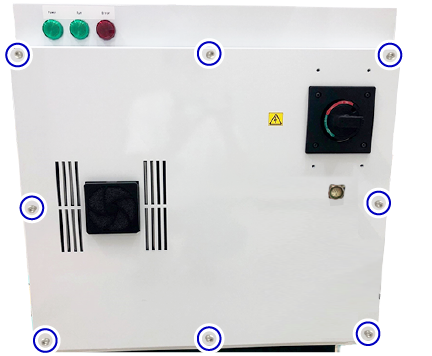
Pass the bolts through the holes of the front panel, and tighten them up with a hex key.
4
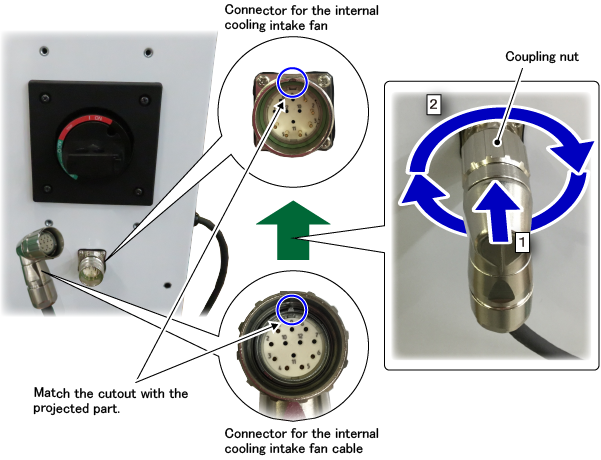
Connect the internal cooling intake fan cable.
- Insert the connector of the internal cooling intake fan cable into the internal cooling intake fan connector. When you insert the connector, match the projected part of the connector with the cutout .
- Turn the coupling nut on the connector of the internal cooling intake fan cable clockwise to fix up.
This completes the operation.
ID : 10564