
 HOME
HOME
ID : 10810
LED Display
The Front Panel of EtherNet/IP Slave Terminal
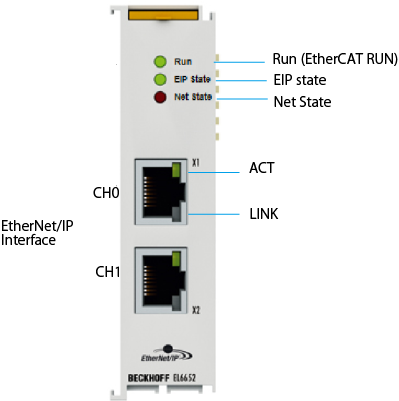
| Name | Description |
|---|---|
| Run | Lights when communication by IPC and EtherCAT is performed correctly. |
| EIP State | Lights when communication by EtherNet/IP is performed correctly. |
| NET State | Lights when network communication is performed correctly. |
| LINK | Lights when the Ethernet is connected to other Ethernet devices. |
| ACT | Blinks when transmits/receives Ethernet frame. |
EtherNet/IP Interface
RJ45 female connector. Use either CH0 or CH1.
Detailed Explanation of Status
The following shows detailed explanation of status.
For further details of contents, refer to the individual instruction manual of the EtherNet/IP slave terminal linked to ”I/O options available to set by WINCAPSIII”. It is written in “7.1 EL6652-0010 - LED”.
LEDs for EtherCAT Diagnosis
| LED | Display | Description | |
|---|---|---|---|
| RUN | green | off | State of the EtherCAT state machine: INIT = initialization of the terminal; BOOTSTRAP = function for terminal firmware updates |
| flashes (200 ms) | State of the EtherCAT state machine: PREOP = function for mailbox communication and different standardsettings set |
||
| off (1 s) on (200 ms) |
State of the EtherCAT state machine: SAFEOP = verification of the sync manager channels and the distributed clocks. Outputs remain in safe state |
||
| on | State of the EtherCAT state machine: OP = normal operating state; mailbox and process data communication is possible |
||
LED EIP State
| Color green | Color red | Meaning |
|---|---|---|
| off | off | no EtherNet/IP slave configuration on the EL6652-0010 |
| on | off | All configured IO assemblies are in data exchange with the EtherNet/IP master. All connections are in the run state (cyclic exchange of valid process data) |
| off (1 s) on (200 ms) |
off | EtherNet/IP slave and IO assembly are correctly parameterized |
| flashes (400 ms) | off | One of the EtherNet/IP slaves has no valid IO assembly configuration |
| off | off (1 s) on (200 ms) |
A general error occurred with the EtherNet/IP slave |
| off | on | Internal error. Replace the EtherCAT Terminal |
LED NET State
| Color green | Color red | Meaning |
|---|---|---|
| off | off | No link detected |
| on | off | EL terminal has detected a link and was configured corre |
| flashes (400 ms) | off | At least one Ethernet port has an active link and a configured EtherNet/IP Slave interface has no valid IP address configured |
| off (1 s) on (200 ms) |
off | All configured EtherNet/I slaves have a valid IP address configuration. UDP and TCP Layer was initialized |
| off | off | Internal error. Replace the EtherCAT Terminal |
| off | off (1 s) on (200 ms) |
A general error occurred with the EtherNet/IP slave LEDs |
LEDs Starting up
| Run | EIP State | NET State | Meaning |
|---|---|---|---|
| off | off | off | No electrical voltage connected to E-bus. The EL6652-0010 must be exchanged if EtherCAT Terminals behind it need to function. |
| off | off | red on | EL terminal is starting up; after approx. 10 seconds, the LED should go out. If this does not happen, the EL6652-0010 module must be exchanged. |
| on | on | red on | EL terminal starts up; the terminal should be ready after approx. 2 - 3s; the startup is completed as soon as the red "NET State" LED goes out. |
ID : 10810