
 HOME
HOME
ID : 11106
Clamp the Cables
This section describes the process to clamp cables with the multi-outlet plate.
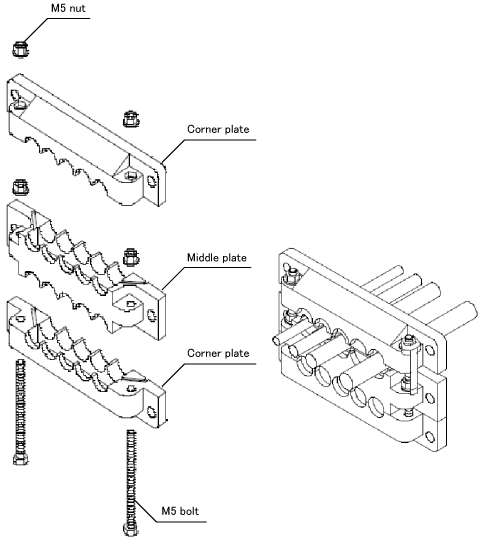
1
Install rubber packings in the ditches of the corner plate and the middle plate.
- Rubber Packing set (accompanied parts)
| Model | Application cable dia. | Application |
|---|---|---|
| EMSP0 | - | To be used as a blind cover |
| EMSP4 | φ4-φ6 | STO cable |
| EMSP6 | φ6-φ8 | Power cable, Safety I/O cable |
| EMSP8 | φ8-φ10 | SmartTP cable |
| EMSP10 | φ10-φ12 | HAND I/O cable |
-
Cable multi-outlet plate kit (sold separately)
To use the cable of communication module option.
| Part name | Part number |
|---|---|
| Cable multi-outlet plate kit (MC9 controller protective box) | 414880-086* |
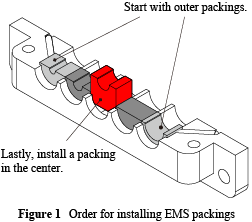
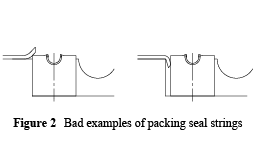
Note the following points when installing the EMS packings on the plates.
- Install the EMS packings in the ditches in order starting from both ends of the ditches to the center. (Figure 1)
- Ensure that the ends of the packing seal strings mounted on the plates are neither lifted up by nor caught in the installed EMS packings. (Figure 2)
2
Pass the M5 bolts through the hex holes of the corner plate. (Put them so that the head of bolts go under the hole.)
3
Pass the cables through the holes between the corner plate and the middle plate. Adjust both plates to the vertical direction.
4
Attach M5 nuts to the M5 bolts.
5
Tighten the corner plate and the middle plate with a spanner until no space remains between the plates.
Tightening torque is 2.0-2.3[N・m].
6
Pass the cables through the holes between the middle plate and the corner plate. Adjust both plates to the vertical direction.
7
Attach M5 nuts to the M5 bolts.
8
Tighten the middle plate and the corner plate with a spanner until no space remains between the plates.
Tightening torque is 2.0-2.3[N・m].
9
Once you finish assembly, pass the cables through the square opening part of the controller protective box (MC9). Pass the M6 screws through the sealing washer holes. With the M6 screws, tighten the plates from the front side of the protective box.
Tightening torque is 5.0-5.5[N・m].
ID : 11106