
 HOME
HOME
ID : 11187
Switching Between Operation Modes
This page describes how to change the operation mode.
1
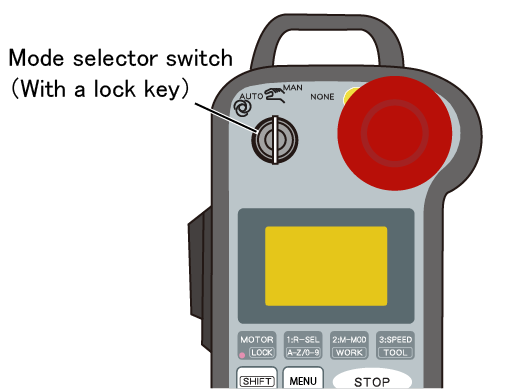
Insert the lock key into the mode selector switch.
2
Turn the lock key to your intended mode.
The table below shows the correlations between the signs above the mode selector switch and the operation modes.
To change to Auto mode, the circuit for enable auto input signals must be short-circuited.
| Signs on the mini-pendant | Operation mode |
|---|---|
| AUTO | Auto mode |
| MAN | Manual mode |
| NONE (*1) | - (*2) |
*1: The mini pendant is available in two types: the new model and the old model. The sign [OPTION] is printed on the Old model instead of [NONE]. The two models have the same performance and specifications.
*2: When the key is positioned at [NONE], an error message remains displayed, disabling operations other than switching the operation modes.
For the robot controller software version 1.4. or lower, if the key is positioned at [NONE] ([OPTION]), the operation mode will be switched to Manual mode.
This completes the procedure for switching the operation modes.
Switching the operation modes will display an icon representing the selected mode on the upper left corner of the screen.
| Icon | Operational mode |
|---|---|
 |
Auto mode |
 |
Manual mode |
ID : 11187