
 HOME
HOME
ID : 1758
Displaying and Setting the Software Motion Limit
Operation path : [F2 Arm] - [F12 Maintenance] - [F8 Motion Space]
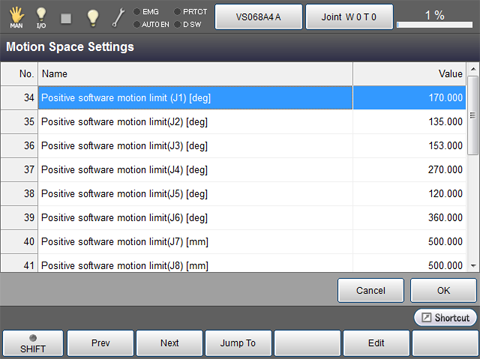
Set the software motion limit in positive and negative directions for each joint.
Press [F8 Motion Space] to display the following [Motion Space Settings] screen.
| Available function keys | |
|---|---|
| [F1 Prev] | Display the previous page of the currently displayed [Motion Space Settings] screen. |
| [F2 Next] | Display the next page of the currently displayed [Motion Space Settings] screen. |
| [F3 Jump To] |
Displays numeric keypad. Enter the software motion limit of the joint to display and select with numeric keypad, and press [OK] to move to the software motion limit of the target joint. |
| [F5 Edit] |
Select the software motion limit of the joint to change, and press [Edit] to display numeric keypad. |
ID : 1758