
 HOME
HOME
ID : 1776
Displaying Setting Menu for Pendant and Panel
Operation path : [F6 Setting] - [F3 Pendant and Panel]
Display setting menu associated with language setting, character size, and panel.
Press [F3 Pendant and Panel] to display the following [Pendant and Panel] window.
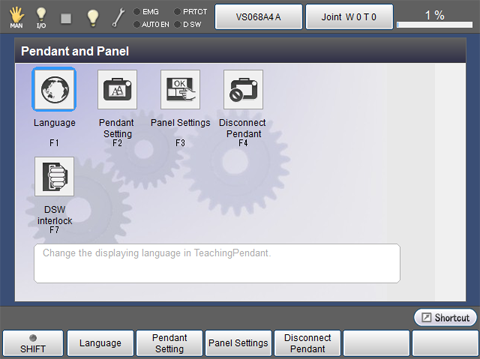
| Available function keys | |
|---|---|
| [F1 Language] | Set the display language for pendant. |
| [F2 Pendant Setting] | Perform settings associated with screen display for the pendant. |
| [F3 Panel Settings] | Perform settings associated with screen display for the panel. |
| [F4 Disconnect Pendant] |
Disconnect the pendant. When pressing this button, system message appears.
Press [OK] to disconnect the pendant. |
| [F7 DSW interlock] | Perform settings associated with the DeadmanSW interlock(motor power,movement key). |
ID : 1776