MC_ForceChangeTable
Change the force control number used when the force control is performed.
| Graphic expression |
FB No. |
FB category |
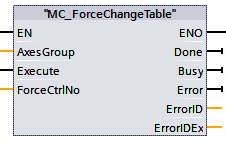 |
FB2023 |
Motion |
Input parameter
| Parameter name |
Data type |
Valid range |
Default |
Omission (*) |
| AxesGroup |
Integer |
1 or larger |
1 |
No |
- Robot number
- Specify an element number for the variable "Robots[n]" (variable in the data block "DB_DENSO_ROBOTS (DB2990)") mapped to the controlled robot (robot controller).
If a specified value exceeds the valid range, the CPU (PLC) stops.
The maximum valid range value is the maximum element number of the variable "Robots[n]". The default maximum element number is 10 but can be increased or decreased by the user.
|
| Execute |
Boolean |
|
False |
No |
- Execution start
- When the parameter is changed from False to True, this FB is executed.
|
| ForceCtrlNo |
Integer |
1 to 10 |
1 |
Yes |
- Force Control Number
- Select a force control number (parameter table number for compliance function) 1 to 10.
|
(*) : For some parameters, entries can be omitted.
- Yes : Entry can be omitted.
- No : Entry required always.
Output parameter
| Parameter name |
Data type / Description |
| Done |
Boolean |
- Execution completion confirmation
- True : This FB execution is completed.
False : This FB execution is not completed.
|
| Busy |
Boolean |
- Processing status of this FB
- True : Being executed.
False : Not being executed.
|
| Error |
Boolean |
- Error presence
- True : This FB ended abnormally.
False : This FB ended successfully.
|
| ErrorID |
Word |
- Error location
- 2800 (hexadecimal) : The error occurred in the PLC program.
2801 (hexadecimal) : The error occurred in the robot controller.
|
| ErrorIDEx |
DWord |
- Error Code
- This is a number to identify the error description.
For details, refer to "Error code list".
|
Function description
This command is available only for the compliance function with the force sensor. For the compliance function without the force sensor, the force control number cannot be changed.
Attention
To execute this FB, FB with the FB category "Motion" needs to be made executable.
To make FB with the FB category "Motion" executable, use the FB "MC_Power".

 HOME
HOME