
 HOME
HOME
ID : 7579
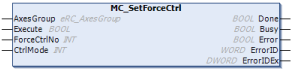
MC_SetForceCtrl
To enable the force control function (Compliance function).
| Graphic expression | FB category |
|---|---|
 |
Motion |
Input and Output Variable
| Variable name | Data type | Valid range | Default | Omission (*) |
|---|---|---|---|---|
| AxesGroup | eRC_AxesGroup | No | ||
|
||||
Input Variable
| Variable name | Data type | Valid range | Default | Omission (*) |
|---|---|---|---|---|
| Execute | Boolean |
|
FALSE | No |
|
||||
| ForceCtrlNo | Integer | 1 to 10 | 1 | Yes |
|
||||
| CtrlMode | Integer | 0, 1 | -1 | Yes |
|
||||
(*) : For some Variable, entries can be omitted.
- Yes : Entry can be omitted.
- No : Entry required always.
Output Variable
| Variable name | Data type / Description |
|---|---|
| Done | Boolean |
|
|
| Busy | Boolean |
|
|
| Error | Boolean |
|
|
| ErrorID | Word |
|
|
| ErrorIDEx | DWORD |
|
Function Description
The force control function provides control over the robot's force. The force control function has two types.
| Compliance Function | A function that controls robots' and its accompanied tools' behavior flexibly against external affects. |
|---|---|
| Compliance Function with Force Sensor | A function that controls the pressure applied on the robot's tool end constantly by using the force sensor. |
Attention
To execute this FB, FB with the FB category "Motion" needs to be made executable.
To make FB with the FB category "Motion" executable, use the FB "MC_Power".
ID : 7579