MC_TeachPosition
To specify the array number on the data block to store the current position.
| Graphic expression |
FB category |
| Ver.5.5 |
Ver.5.35 |
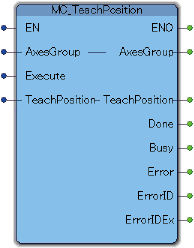 |
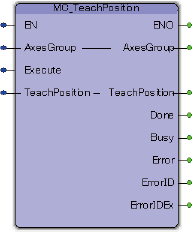 |
Unique |
Input and Output Variable
| Variable name |
Data type |
Valid range |
Default |
Omission (*) |
| AxesGroup |
eRC_AxesGroup |
No |
- Robot Group
- Specify a robot variable (structured type data : eRC_AxesGroup) of user-defined type.
|
| TeachPosition |
eRC_PosDensoRobot |
No |
- Teaching position
- Specify a variable to store the current position.
It consists of three structure type data. ("eRC_Position", "eRC_Joint", "eRC_CoordSys")
|
Input Variable
| Variable name |
Data type |
Valid range |
Default |
Omission (*) |
| Execute |
Boolean |
|
FALSE |
No |
- Execution start
- When the variable is changed from FALSE to TRUE, this FB is executed.
|
(*) : For some Variable, entries can be omitted.
- Yes : Entry can be omitted.
- No : Entry required always.
Output Variable
| Variable name |
Data type / Description |
| Done |
Boolean |
- Execution completion confirmation
- TRUE : This FB execution is completed.
FALSE : This FB execution is not completed.
|
| Busy |
Boolean |
- Processing status of this FB
- TRUE : Being executed.
FALSE : Not being executed.
|
| Error |
Boolean |
- Error presence
- TRUE : This FB ended abnormally.
FALSE : This FB ended successfully.
|
| ErrorID |
Word |
- Error location
- 2800 (hexadecimal) : The error occurred in the PLC program.
2801 (hexadecimal) : The error occurred in the robot controller.
|
| ErrorIDEx |
DWord |
- Error Code
- This is a number to identify the error description.
For details, refer to "Error code list".
|
Function Description
-
Attention
-

 HOME
HOME