
 HOME
HOME
TrackBufferSort
Function
Change the sorting order of data within the conveyor tracking buffer.
Syntax
TrackBufferSort Conveyor number, SortType1 [, SortType2]
Guaranteed Entry
- Conveyor number
-
Specify the conveyor number (1 or 2) to be used by integer type data.
- SortType1
-
Specify the sort type for all data within the conveyor tracking buffer by integer type data.
When the power is turned off, the specified sort type value returns to the default setting "0".Setting value First sorting method Second sorting method -1 - - Set the value of SortType1 to -1 when you want to apply only SortType2. Setting value First sorting method Second sorting method 0 Workpieces are sorted in ascending order of user data. Workpieces are sorted in order from the downstream. 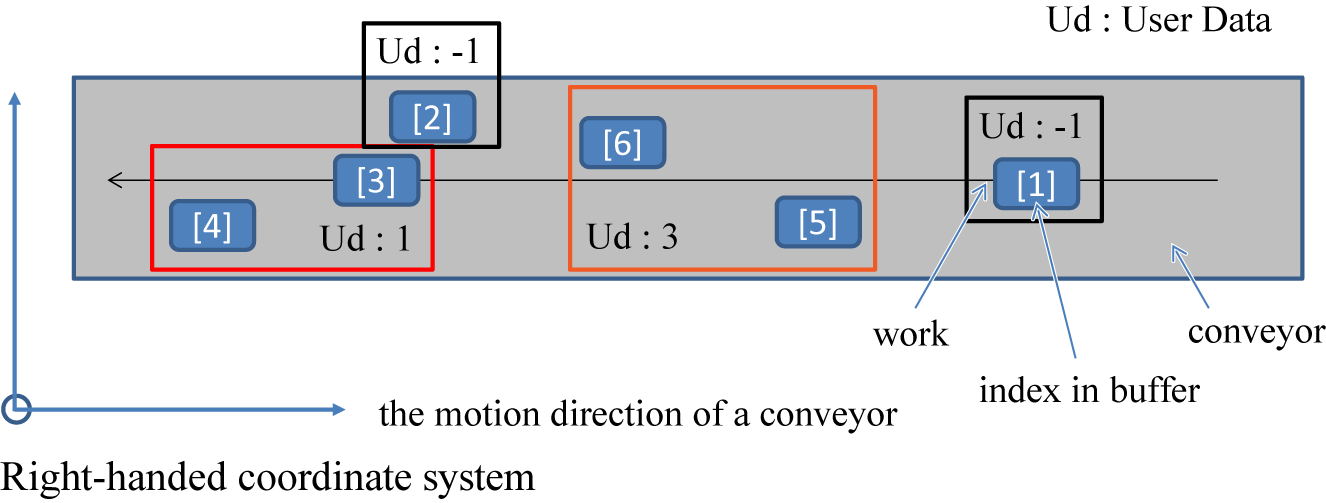
This is the default setting when the controller is started.
They are sorted in ascending order of user data, and then workpieces in each group are sorted in order from the downstream.Setting value First sorting method Second sorting method 1 None Workpieces are sorted in order from the downstream. 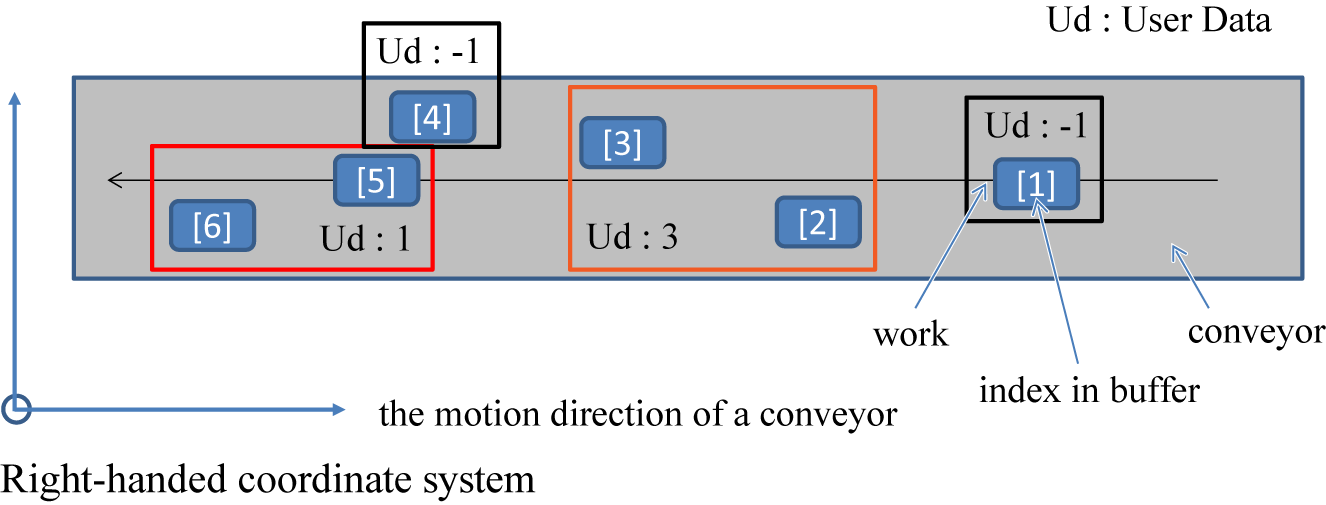
Only the second sorting method is performed, not the first one.
All workpieces within the conveyor tracking buffer are sorted in order from the downstream.Setting value First sorting method Second sorting method 2 Workpieces are sorted in ascending order of user data. Workpieces are sorted in order from the left to the motion direction of the conveyor. 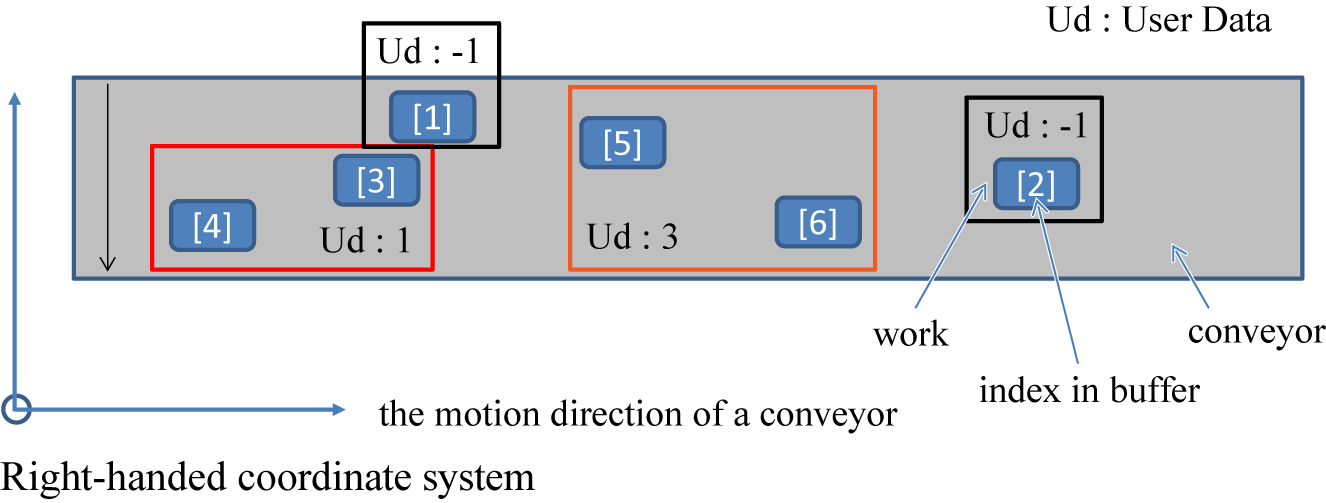
They are sorted in ascending order of user data, and then workpieces in each group are sorted in order from the left to the motion direction of the conveyor. Setting value First sorting method Second sorting method 3 None Workpieces are sorted in order from the left to the motion direction of the conveyor. 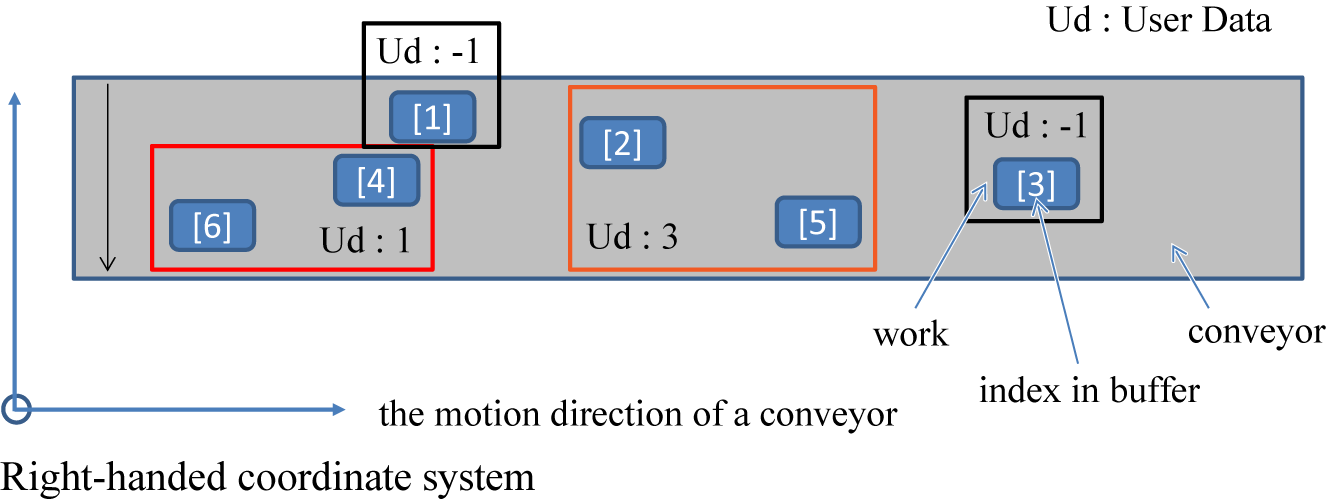
Only the second sorting method is performed, not the first one.
All workpieces within the conveyor tracking buffer are sorted in order from the left to the motion direction of the conveyor.Setting value First sorting method Second sorting method 4 Workpieces are sorted in ascending order of user data. Workpieces are sorted in order from the upstream. 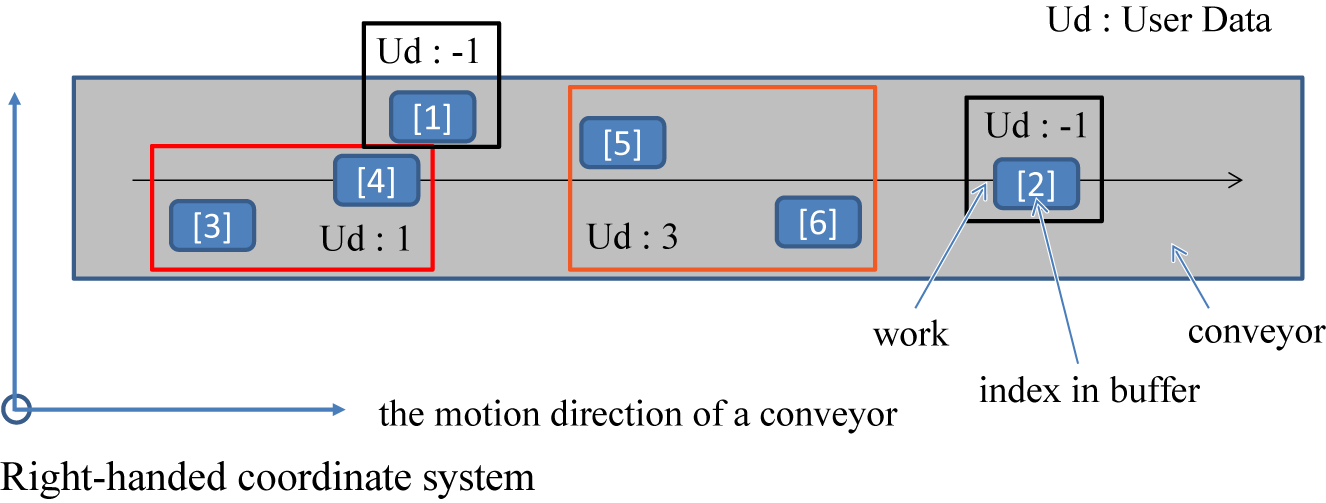
They are sorted in ascending order of user data, and then workpieces in each group are sorted in order from the upstream. Setting value First sorting method Second sorting method 5 None Workpieces are sorted in order from the upstream. 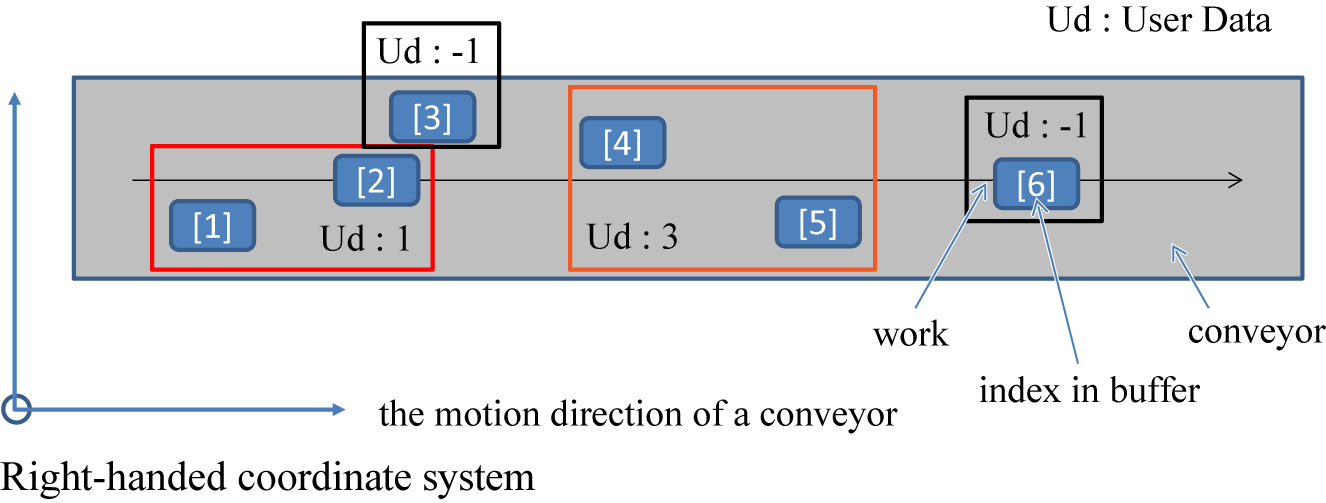
Only the second sorting method is performed, not the first one.
All workpieces within the conveyor tracking buffer are sorted in order from the upstream.Setting value First sorting method Second sorting method 6 Workpieces are sorted in ascending order of user data. Workpieces are sorted in order from the right to the motion direction of the conveyor. 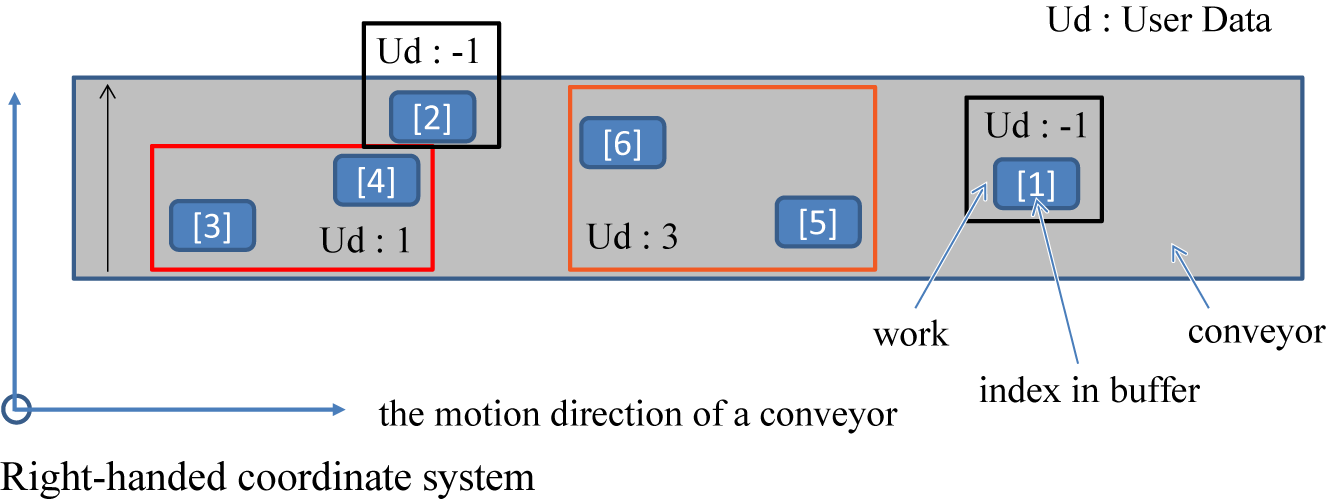
They are sorted in ascending order of user data, and then workpieces in each group are sorted in order from the right to the motion direction of the conveyor. Setting value First sorting method Second sorting method 7 None Workpieces are sorted in order from the right to the motion direction of the conveyor. 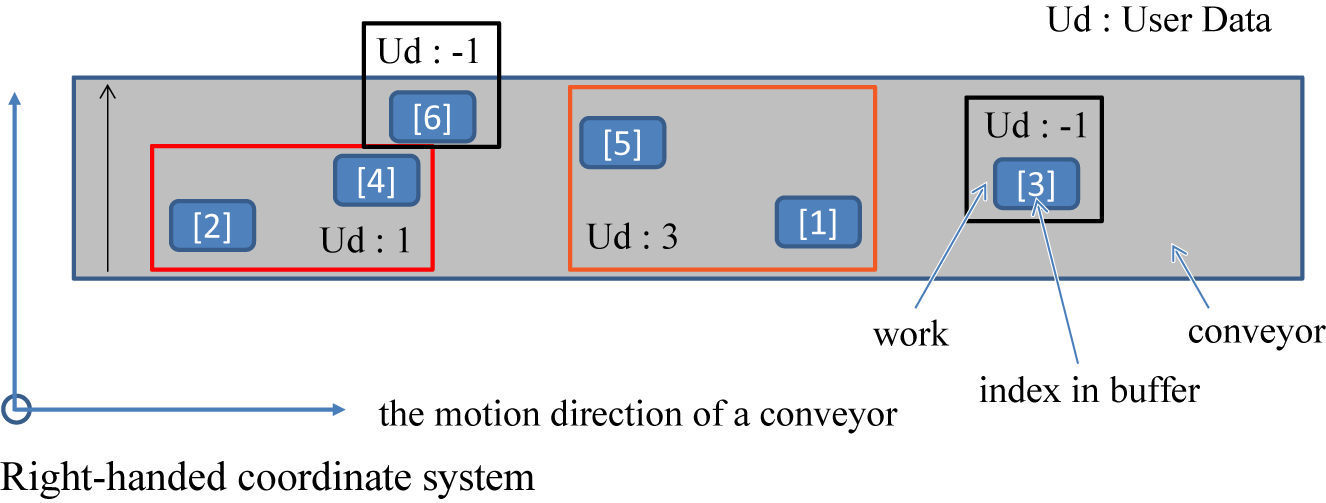
Only the second sorting method is performed, not the first one.
All workpieces within the conveyor tracking buffer are sorted in order from the right to the motion direction of the conveyor.Setting value First sorting method Second sorting method 8 Workpieces are sorted in ascending order of user data. Workpieces are sorted in descending order of attribute data. 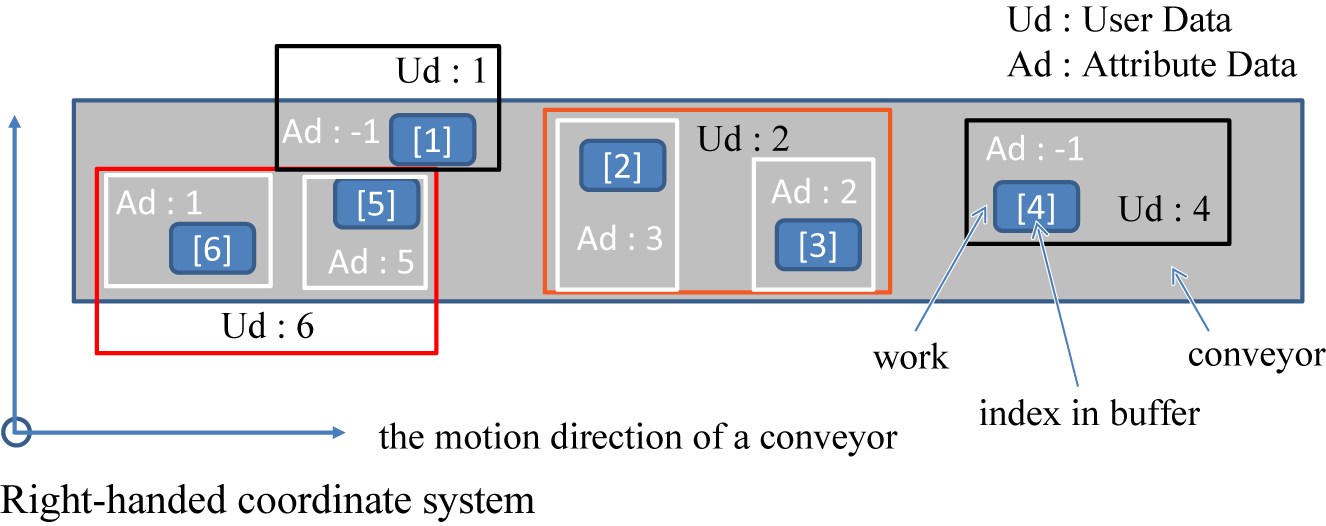
They are sorted in ascending order of user data, and then workpieces in each group are sorted in descending order of attribute data. Setting value First sorting method Second sorting method 9 None Workpieces are sorted in descending order of attribute data. 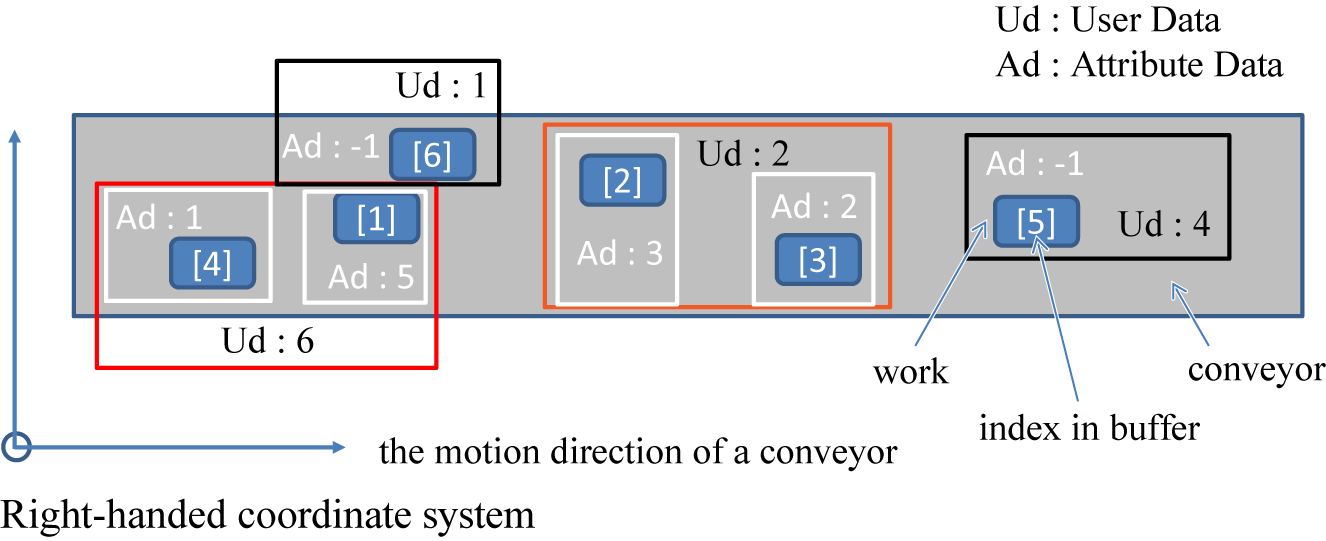
Only the second sorting method is performed, not the first one.
All data within the conveyor tracking buffer are sorted in descending order of attribute data.Setting value First sorting method Second sorting method 10 Workpieces are sorted in ascending order of user data. Workpieces are sorted in ascending order of attribute data. 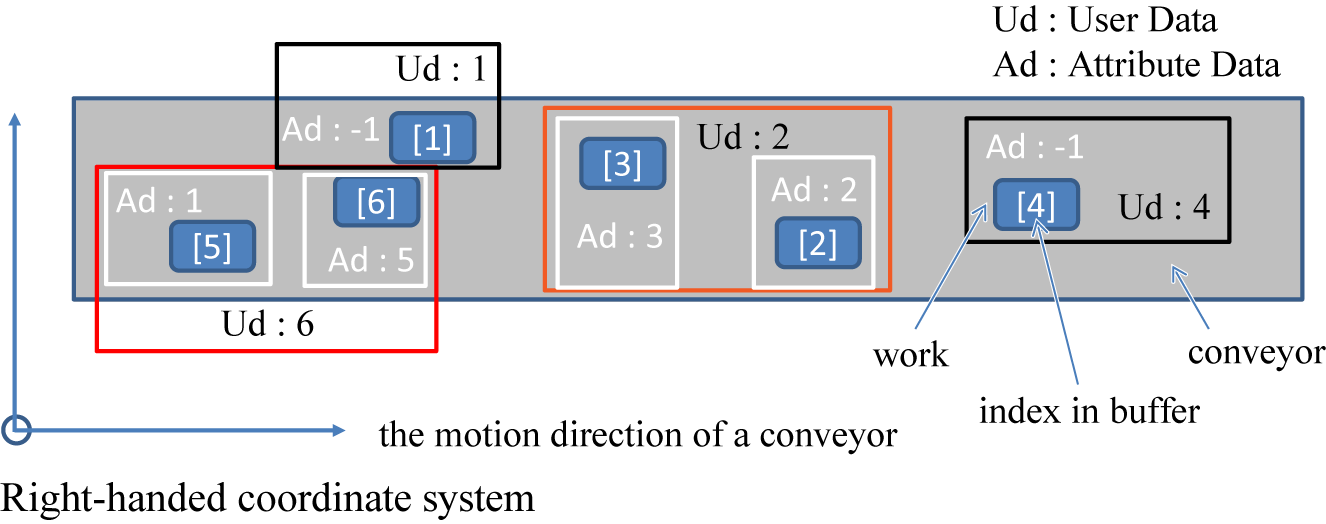
They are sorted in ascending order of user data, and then workpieces in each group are sorted in ascending order of attribute data. Setting value First sorting method Second sorting method 11 None Workpieces are sorted in ascending order of attribute data. 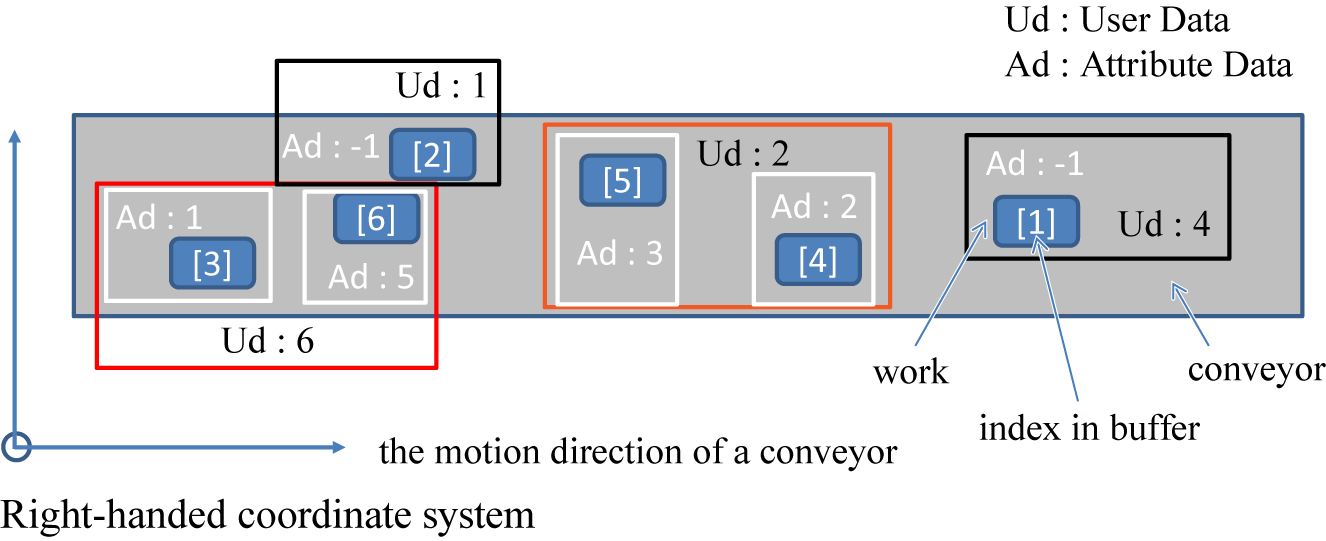
Only the second sorting method is performed, not the first one.
All data within the conveyor tracking buffer are sorted in ascending order of attribute data. - SortType2
-
Specify the sort type for groups with particular user data within the conveyor tracking buffer by a variant type single array. This is an optional value.
When no user data is used for the first sorting method of SortType1, the option specified in SortType2 will be ignored.
Specify the value of each element as the integer type data single array with a length of 2, which consists of the sort target user data and the sort type setting value as follows:When SortType2 is set to -1, the previous setting value will be cleared. When the power is turned off, the specified sort type will be cleared. -
You can set the following six values for the sort type. Specify by Integer type data. Each sorting method is the same as the second sorting method of SortType1.
| Index | Description | |
|---|---|---|
| Index | Description | |
| 0 | 0 | Sort target user data (integer type data) |
| 1 | Sort type setting value (integer type data) | |
| 1 | 0 | Sort target user data (integer type data) |
| 1 | Sort type setting value (integer type data) | |
| ・・・ | 0 | Sort target user data (integer type data) |
| 1 | Sort type setting value (integer type data) | |
| N | 0 | Sort target user data (integer type data) |
| 1 | Sort type setting value (integer type data) | |
| Setting value | Sorting method |
|---|---|
| -1 | - |
| 0 | Workpieces are sorted in order from the downstream. |
| 1 | Workpieces are sorted in order from the left to the motion direction of the conveyor. |
| 2 | Workpieces are sorted in order from the upstream. |
| 3 | Workpieces are sorted in order from the right to the motion direction of the conveyor. |
| 4 | Workpieces are sorted in descending order of attribute data. |
| 5 | Workpieces are sorted in ascending order of attribute data. |
Description
Change the sorting order of data within the conveyor tracking buffer. First, sort all data within the conveyor tracking buffer, based on the sort type specified in the second argument SortType1.
(1) Sort all data within the conveyor tracking buffer, based on the first sorting method.
(2) Sort the same data in the second method again, which was sorted in the first method. When the data are sorted in the same order, sort them in the storage order before the command is executed.
When the third argument SortType2 is set, after sorting the data in the above methods, change the sorting order of the data in groups with specified user data within the conveyor tracking buffer.
Related Terms
TrackBufferDelete, TrackBufferIndexes, TrackBufferRead, TrackCurBufferSort, TrackSetSensor, TrackSetVision, TrackTargetPos, Commands for Conveyor Tracking
Attention
- This is the conveyor tracking operation-dedicated command.
- If the tracking buffer contains a large amount of data, the sort operation may take time.
- When the power is turned off, the value of SortType1 returns to the default, and that of SortType2 is cleared.
Example
- Set the sort type for all data within the buffer. Retrieve the sorted data in order from the beginning.
If I[50] = 1 Then
  ' Sort the data in order from the left to the motion direction of the conveyor
  TrackBufferSort 1, 3
ElseIf I[50] = 2 Then
  ' Sort the data by the attribute value
  TrackBufferSort 1, 9
Else
  ' Return to the default setting (sort the data in the direction of the conveyor vector)
  TrackBufferSort 1, 0
End If

' Retrieve the sorted data in order from the beginning
P[10] = TrackTargetPos(1, -1)- Set the sort type for each user data.
If I[50] = 1 Then
 ' Keep the current settings of the entire buffer
 ' Sort only the data in groups with the user data 5 by the attribute value
 ' Sort only the data in groups with the user data 1 in order from the left to
   the motion direction of the conveyor
  TrackBufferSort 1, -1, Array(Array(5, 4), Array(1, 1))
End If- Clear the sort type set for each user data.
If I[51] = 1 Then
 ' Clear the setting values of groups with the user data 5
 ' Clear the setting values of groups with the user data 1
  TrackBufferSort 1, -1, Array(Array(5, -1), Array(1, -1))
End If- Set the sort type for each group with particular user data. Retrieve the sorted data in order from the beginning.
If I[50] = 1 Then
 ' Sort the data within the entire buffer in the direction of the conveyor vector
 ' Sort only the data in groups with the user data 5 by the attribute value
 ' Sort only the data in groups with the user data 1 in order from the left to
   the motion direction of the conveyor
  TrackBufferSort 1, 0, Array(Array(5, 4), Array(1, 1))
End If

' Retrieve the sorted data in groups with the user data 5 in order from the beginning
P[10] = TrackTargetPos(1, -1, 5)

'....

' Retrieve the sorted data in groups with the user data 1 in order from the beginning
P[10] = TrackTargetPos(1, -1, 1)

'....

' Retrieve the sorted data in order from the beginning in the direction of the conveyor vector
P[10] = TrackTargetPos(1, -1)