
 HOME
HOME
ID : 1138
Using a SINTOKOGIO Force Sensor
This page describes the necessary equipment for the Compliance Function with Force Sensor under the use of SINTOKOGIO force sensor.
- To use a force sensor of this manufacturer, software version the robot controller must be version 2.11.0 or higher.
Available Force Sensor
Among ZYXer series force sensors of SINTOKOGIO, following models are available.
| Model | Rated load | Outline drawig | ||
|---|---|---|---|---|
| Translational force [N] | Moment [Nm] | |||
Low load model |
(*1) |
Fx、Fy : ±50 Fz : ±100 |
Mx、My : ±0.5 Mz : ±0.5 |
refer to (PDF:3,303KB) |
Standard model |
(*2) |
Fx、Fy : ±500 Fz : ±500 |
Mx、My : ±20 Mz : ±20 |
refer to (PDF:1,201KB) |
Middle load model |
Fx、Fy : ±1000 Fz : ±1000 |
Mx、My : ±30 Mz : ±30 |
refer to (PDF:1,582KB) | |
High load model |
(*1) |
Fx、Fy : ±5000 Fz : ±10000 |
Mx、My : ±500 Mz : ±250 |
refer to (PDF:2,464KB) |
|
*1,*2 : Among force sensors listed in the above table, some of them equip a converter (a equipment that converts the force sensor signal to the one to be received by a robot controller). Models having (*1) in the above table do not equip a converter. Models having (*2) equip a converter. For (*1) models, when you connect a force sensor with a robot controller, connect them through an external converter. Common SpecificationFor any model, data exchange between a robot controller and a force sensor is done via RS-422A communication. The baud rate of RS422A communication is 46800bps in the standard model. You can change the baud rate to 92160bms when placing an order though, the baud rate of the robot controller is 46800bps at the maximum. Therefore, do not change it to 92160bps. |
||||
Information of each force sensor written above is only a part of the entire information. For details, refer to SINTOKOGIO,LTD. website.
System Configuration
The following image shows the system configuration.
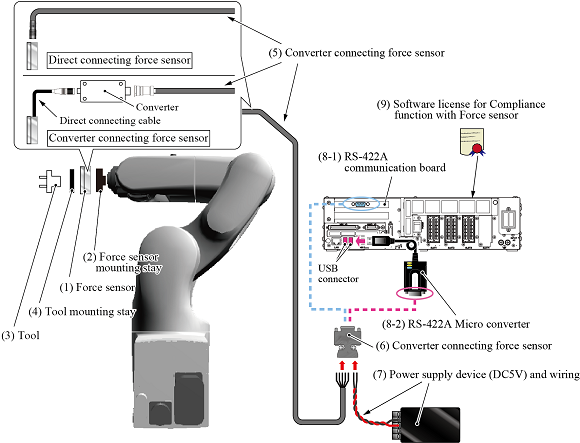
Periodically check the force sensor.
Components / Manufacturer / Model(Part number) |
Description | ||||
|---|---|---|---|---|---|
(1) Force sensorSINTOKOGIO,LTD.
|
Select a force sensor according to your application. If you purchase a converter connecting force sensor, a converter is shipped with a force sensor. Also, a converter connecting force sensor has a cable that connects a converter. The length of the direct connecting cable is 2m. Fix the converter to the robot arm. A converter connecting force sensor and a converter is paired with a serial number. Connect a converter connecting force sensor to a converter having the same serial number. |
||||
(2) Force sensor mounting stay(made by customer) |
A stay for fixing a force sensor to the end of the robot arm. For details, refer to "How to Install a Force Sensor". |
||||
(3) Tool(selected by customer) |
Select a tool according to your application. | ||||
(4) Tool mounting stay(made by customer) |
A stay for fixing a tool to the force sensor. Create a stay with referring to the outline drawing of Available force sensor. |
||||
(5) force sensor cableSINTOKOGIO,LTD.
|
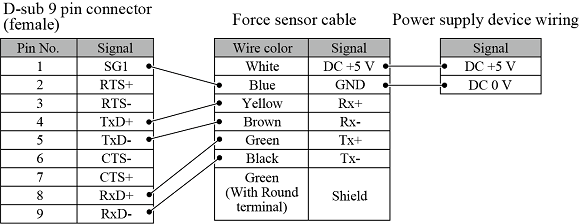
A cable that connects the force sensor to the robot controller. Specify the length of the cable when you purchase the force sensor. The cable end of the robot controller connection side is loose-wire. Connect individual wire of the loose-wire to the applicable pins on D-sub 9 pin connector (female). For information about how to connect wires, refer to "How to connect pins for D-sub 9 pin connector (female)" in the bottom of this page. |
||||
(6) D-sub 9 pin connector (female)(selected by customer) |
This connector connects the force sensor cable and the cable of the power supply device (see below) to the robot controller. For information about how to connect wires, refer to "How to connect pins for D-sub 9 pin connector (female)" in the bottom of this page. |
||||
(7) Power supply device (DC5V) and wiring(selected by customer) |
A power supply device and its wiring that feed electrical power to the force sensor. Prepare device having the following specification.
For information about how to connect wires, refer to "How to connect pins for D-sub 9 pin connector (female)" in the bottom of this page. |
||||
|
The following two devices are available for the Force sensor and robot controller connection.
|
|||||
(9) Software license for Compliance function with Force sensorDENSO WAVE Inc.
|
This is a DENSO product. A license to enable the Compliance function with Force sensor. There are two options: "Compliance function-activated" and "License only". "Compliance function-activated" targets a newly purchased robot set. Ordering this option with a robot set will activate the Compliance function with force sensor before shipment. Please order this option with a robot set. For about how to activate the function, please refer to "Activation of the Compliance Function with Force Sensor". |
||||
How to Connect Pins for D-sub 9 Pin Connector (Female)
Describe the pin connection by assigning a number for each pin on D-sub 9 pin connector (female) as shown below.
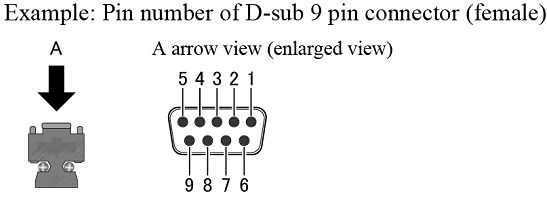
The following figure shows the pin connection between connectors (wiring table), Connect pins with referring to the followings.
ID : 1138