
 HOME
HOME
ID : 1141
System Configuration of Net Box-connection Type Force Sensor
The following image shows the system configuration.
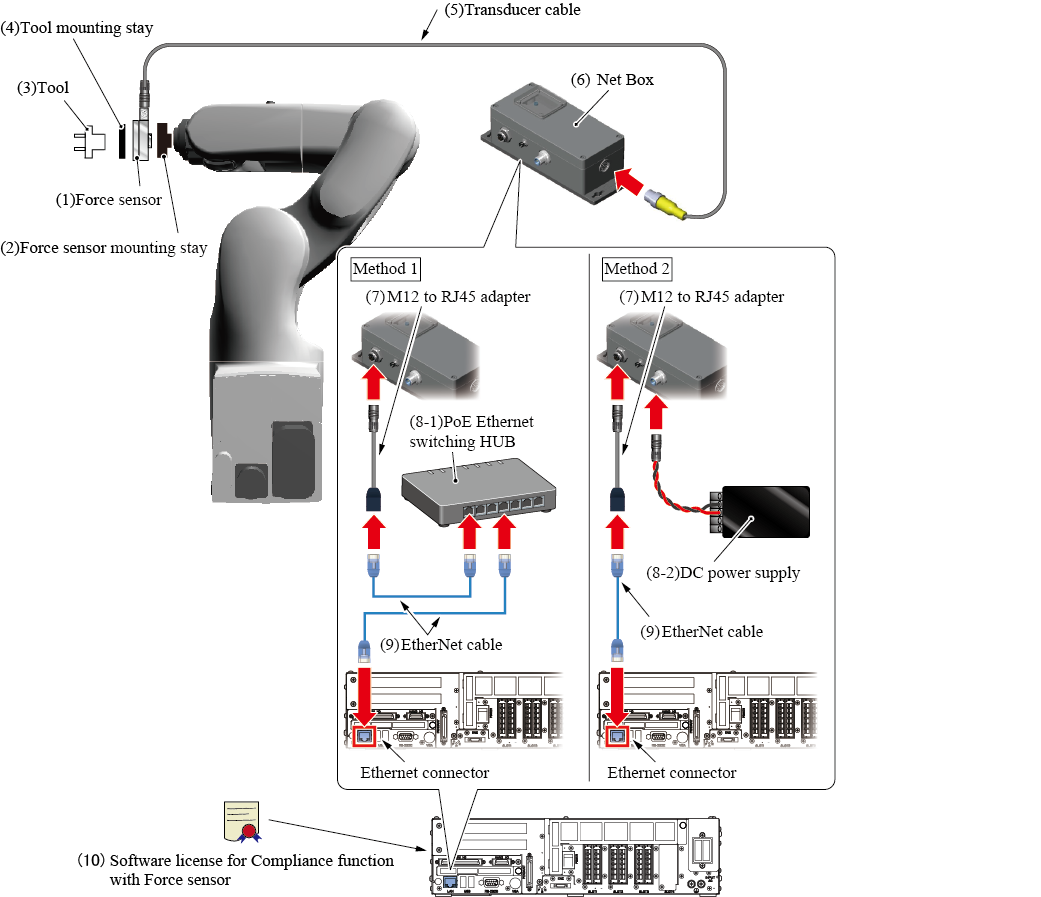
When creating a system, refer to the instruction manual published on ATI Industrial Automation website and perform it correctly and safely, in addition to the following contents.
Periodically check the force sensor.
Components / Manufacturer / Model(Part number) |
Description | ||||
|---|---|---|---|---|---|
(1) Force sensorATI Industrial Automation
|
Select a force sensor according to your application. In the instruction manual of ATI Industrial Automation, the force sensor is described as "Transducer". |
||||
(2) Force sensor mounting stay(made by customer) |
A stay for fixing a force sensor to the end of the robot arm. For details, refer to "How to Install a Force Sensor". |
||||
(3) Tool(selected by customer) |
Select a tool according to your application. | ||||
(4) Tool mounting stay(made by customer) |
A stay for fixing a tool to the force sensor. Create a stay referring to the outer dimension drawing of the force sensor published on ATI Industrial Automation website. |
||||
(5) Transducer cableATI Industrial Automation
|
A cable to connect the force sensor and the Net Box. When you purchase the force sensor, this cable will be accompanied. Depending on the force sensor, some force sensors are integrated with a cable (a force sensor and a cable cannot be separated) (hereafter, "cable integrated type"). Nano and Mini series are the cable integrated type. The length is different between the cable integrated type and other force sensors (hereafter, "cable separated type").
Specify the length when you purchase the force sensor. |
||||
(6) Net BoxATI Industrial Automation
|
An interface to connect a force sensor and a robot controller so as to be able to communicate between these devices. When you purchase the force sensor, this product will be accompanied. For details, refer to the instruction manual published on ATI Industrial Automation website. |
||||
(7) M12 to RJ45 adapter(purchased from ATI Industrial Automation. Or made by customer) |
An adapter (a cable) to connect the Net Box and a robot controller through Ethernet cable. You can purchase it from ATI Industrial Automation. Or this can be made by customer. For details, refer to the instruction manual published on ATI Industrial Automation website. |
||||
|
You need to supply electricity to the Net Box. You can select from the following two methods.
|
|||||
(9) EtherNet cable(selected by customer) |
This connects the Net Box and a robot controller through the M12-RJ45 adapter. Select an Ethernet cable that is fulfilled with the following specification.
|
||||
(10) Software license for Compliance function with Force sensorDENSO WAVE Inc.
|
This is a DENSO product. A license to enable the Compliance function with Force sensor. There are two options: "Compliance function-activated" and "License only". "Compliance function-activated" targets a newly purchased robot set. Ordering this option with a robot set will activate the Compliance function with force sensor before shipment. Please order this option with a robot set. For about how to activate the function, please refer to " Activation of the Compliance Function with Force Sensor". |
||||
ID : 1141