HOME
HOME
Cooperative Control Function-related Setting On The Master Controller
Enter a license necessary for the cooperative control function, perform cooperative control function-related settings on the master controller, and then enter IP address of the slave controller. The license for the cooperative control function on the master controller is paid license.
For the way of obtaining a license, refer to "Optional Function and License ".
Adding a License for Cooperative Control Function
Operation path:[F6: Setting]-[F8:Option]-[F1:Extension]
Add a license for the cooperative control function to the controller.
For details, refer to "Displaying and Adding/Deleting Function Extension Screen" in "TEACH PENDANT OPERATION GUIDE".
Controller Settings
Operation path: [F6:Setting]-[F9:Cooperation]
To perform this operation, set the user level "Maintainer".
Set the following items that are related to the controller.
Once the settings have completed, reboot the controller.
Coordination Controller Configuration
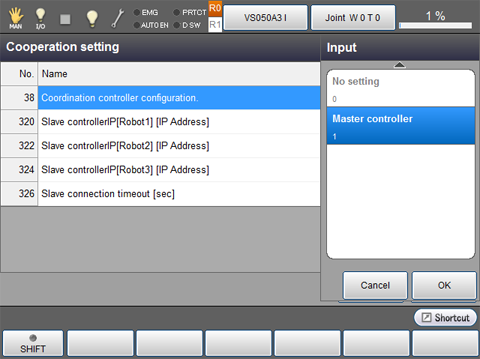
Designate the currently setting controller to the master controller. On the Cooperation setting window, press "Cooperation controller configuration", and then press "1" (Master controller) from the Input pane, and then press [OK].
Entering IP Address of the Slave Controller
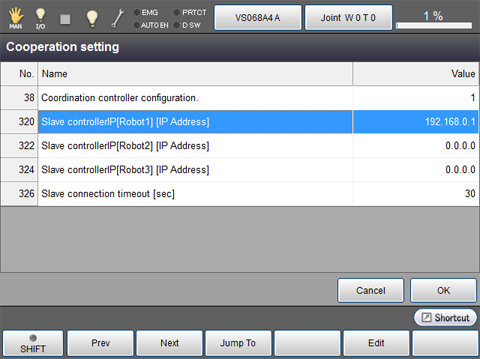
Enter IP address of the slave controller.
Once 0000 is assigned to a slave-controller, slave-controllers written below will be invalid as well.
Setting of Slave Controller Startup Waiting Time
The master controller connect to slave controllers at the startup. Slave controllers, on the other hand, wait the connection from the master controller for a certain period of time after startup.
Therefore, the master and slave controllers must be turned ON simultaneously as much as possible.
If slave controllers have not started-up when the master connects, an error occurs. To avoid this error, set larger value to "Slave connection timeout" so that the master controller can wait the connection.
Adjust this parameter value if an connection error occurs at the startup.
Slave Controller Confirmation
Turn OFF the master controller, and then turn ON the master and slave controllers simultaneously.
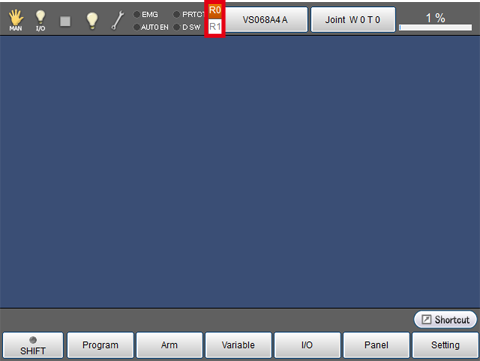
Check that the robot names for cooperative control function are properly displayed on the top of the screen.