
 HOME
HOME
ID : 9693
Acquiring, Displaying and Saving Servo Log
Operation path : [F2 Arm] - [F3 Servo State] - [Servo log tab]
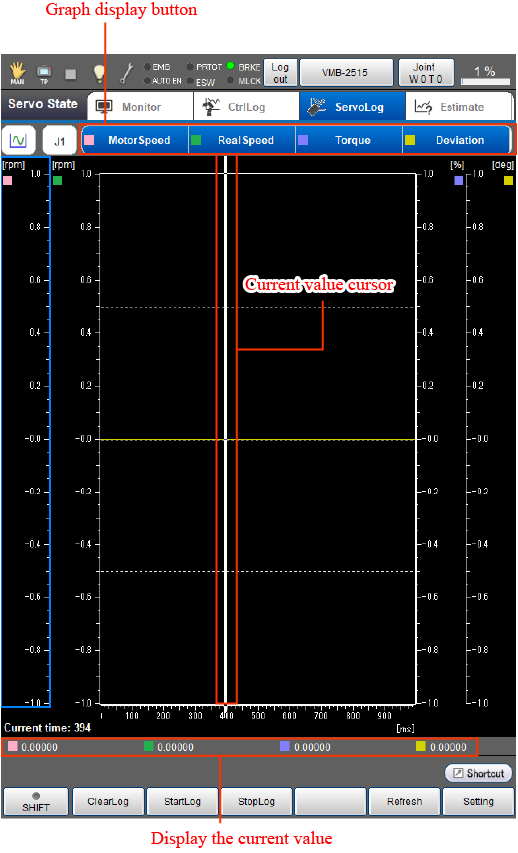
Acquire servo logs of respective items including motor speed instruction, actual motor speed, torque instruction, position deviation, current value, instruction value, and encoder value and display the graph on the window of the smart TP.
Press [Servo Log tab] to display the following [ServoLog] window.
Control log and servo log use the same ring buffer. Therefore, when you start recording/stop recording/clear the one log, the same operation is executed for the other log.
Touching an icon on the upper left will displays a pull down menu that includes operation mode as shown below. There are three types of operation modes available.
| Operation mode | Description | Right/Left arrow keys |
UP/Down arrow keys | Screen touch |
|---|---|---|---|---|
 Move the display |
Shifts the display range of the graph axis. | Pressing Right/Left arrow keys will move the display range of the X axis. | Pressing Up/Down arrow keys will move the display range of the selected Y axis. | The display range of the X axis moves. |
 Change the scale |
Expands or contracts the display range of the graph axis. | Pressing the Right/Left arrow keys will expand or contract the display range of the X axis. | Pressing the Up/Down arrow keys will expand or contract the display range of selected Y axis. | The display range of the X axis moves. |
 Check the current |
Value of the selected range. | Pressing the Right/Left arrow keys will move the cursor indicating the current value. | Not used. | The cursor indicating the current value moves to the position where you touched. |
| Available function keys | |
|---|---|
| [F1 Clear Log] (*) | Servo log and control log are initialized. The ring buffer is cleared so that new logs can be saved. |
| [F2 Start Log] (*) |
Starts acquiring servo log and control log. REC on the icon of servo log and control log tab turns on when the acquisition of servo log and control log is started. |
| [F3 Stop Log] (*) |
Stops acquiring servo log and control log. REC on the icon of servo log and control log tab turns off when the acquisition of servo log and control log is completed. |
| [F5 Refresh] (*) | Updates to the latest information on the servo log display window of the smart TP. |
| [F6 Setting] |
Displays [Servo log settings] window. Confirm and change the settings associated with servo log acquisition. |
| [F7 Switch Y-Value display] | Changes the display of Y-axis scale between vertical and horizontal. Setting the Y-axis scale to the vertical direction will expand the display range of the graph. |
| [F8 Change axis display range] | Changes the display range of the X- or Y-axis. Pressing [F8 Change axis display range] will display the setting window. Select desired operation from the followings.
|
| Keys other than function keys | |
|---|---|

|
Pressing this button will display a pull down menu. |
| Graph display button |
Pressing the button will display graphs of the currently assigned logs. There are seven types of logs as shown below. You can assign up to four types of logs by pressing [F6 Setting].
|
ID : 9693
- Related Information
- Displaying and Changing the Servo Log Setting