
 HOME
HOME
ID : 9744
User Account Management (Ver 1.2.* or Lower)
Operation path: [F6 Setting] - [F1 User account management]
Manage the user account.
Operations available depending on the name and level of a user level differ between the robot controller software version "1.3.*" or higher and "1.2.*" or lower.
If the software version is "1.3.*" or higher, see here.
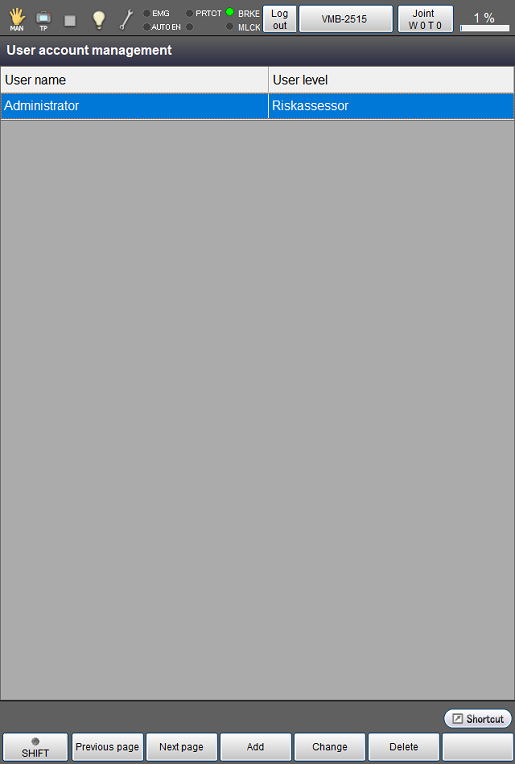
How to Add an Account
Operation path: [F6 Setting] - [F1 User account management] - [F3 Add]
Enter the following, and tap [OK] to create a new account.
| User ID | Create a user ID with letters and numbers between 4 to 20 characters. IDs are case-sensitive. Available signs are “@ (at sign)” and “_ (understrike)” only. |
|---|---|
| Password | Create a password with numbers between 4 and 20 digits. |
User level |
Select a user level. |
Available operations differ depending on the user level.
| User level | Details | Mode Switching |
|---|---|---|
| Operator |
|
Not available |
|
Programmer (restricted) |
|
Available |
| Programmer |
|
Available |
| Maintainer |
|
Available |
| RiskAssessor |
|
Available |
* 1: Deleting the extension function, permitting the version upgrade, editing the encoder reference position/resetting the encoder, specifying the CALSET-related settings, service function
* 2: Adding/deleting a user account, changing user account information (user name, password, user level) other than your own account, setting the auto logout time
How to Change an Account
Operation path: [F6 Setting] - [F1 User account management] - [F4 Change]
You can change the user ID and password for the logged-in account.
An account with the user level RiskAssessor can change the user IDs, passwords, and user levels of all accounts.
How to Delete an Account
Operation path: [F6 Setting] - [F1 User account management] - [F5 Delete]
You can delete an account.
Programmer (restricted)
Programmer (restricted) is a user level to which some of the functions available to the normal "Programmer” are not available.
When specifying the user level Programmer (restricted), you can choose whether to permit the use of the following four robot motion–related functions or not.
- Manual operation
- Variable move
- Turning on/off the I/O function
- Program start functions (Program Start, Cycle Start, Step Start, Continuous Start)
Use this feature if you want to permit an operator to use only some of the functions available to "Programmer” such as the manual operation and variable move.
Users who operate a robot must be limited to only those who have taken the training required to operate a robot safely. For more information about "Users", visit this link.
Setting Method
1
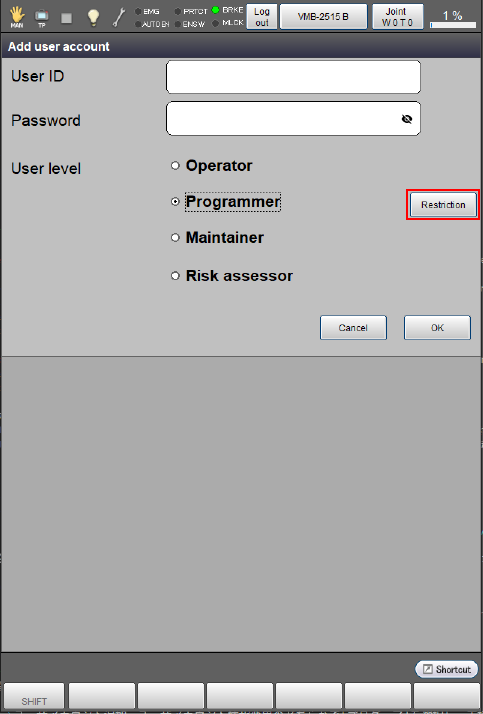
In either [Add user account] or [Change user account information] window, select [Programmer] and press the [Restriction] button enclosed by the red square.
2
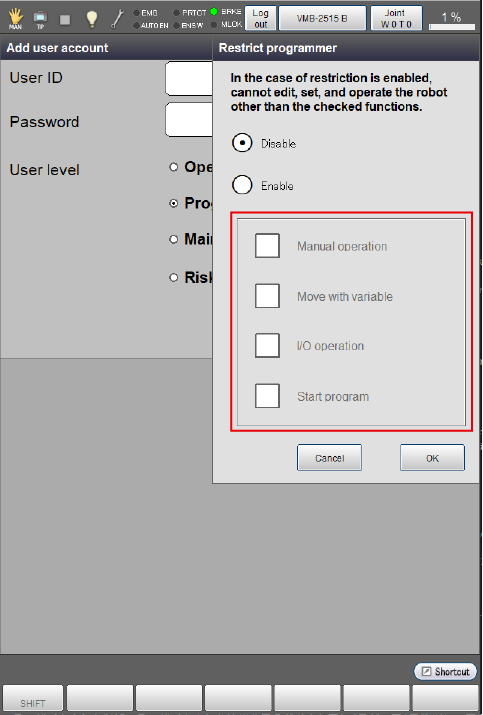
Select “Enable” in the “Restrict programmer” tab.
Check a function to permit in the red square below.
Functions checked here will be available to the user account.
Functions available to Operator and Programmer respectively are as follows.
For Programmer (restricted), all functions other than the table below and mode switching are equivalent to Operator.
| Function | Operator | Programmer | Programmer (restricted) |
|
|---|---|---|---|---|
Check box |
||||
| Checked | Not checked | |||
Manual operation (± hardware key) |
- | ● | ● | - |
| Variable move | - | ● | ● | - |
I/O operation (ON/OFF) |
- | ● | ● | - |
| Program start | - | ● | ● | - |
| Clear error | - | ● | ● | ● |
| STO reset | - | ● | ● | ● |
| Motor ON | - | ● | ● | ● |
| External speed | - | ● | ● | ● |
Mode switching (Auto/Manual/Program Check) |
- | ● | ● | ● |
Move mode switching (Joint/X-Y/TOOL) |
- | ● | ● | ● |
Coordinate system selection (Work number/ Tool number) |
- | ● | ● | ● |
● : Available - : Not available
Default Account
Delete this account if it is unnecessary.
The following shows a password and user level of the default account.
| Account name | Password | User level |
|---|---|---|
| Administrator | 1234 | RiskAssessor |
ID : 9744