
 HOME
HOME
ID : 9689
Displaying Current Position Information and 3D Image of Robot
Operation path: Basic screen - [F2 Arm]
Display the current position information of robot.
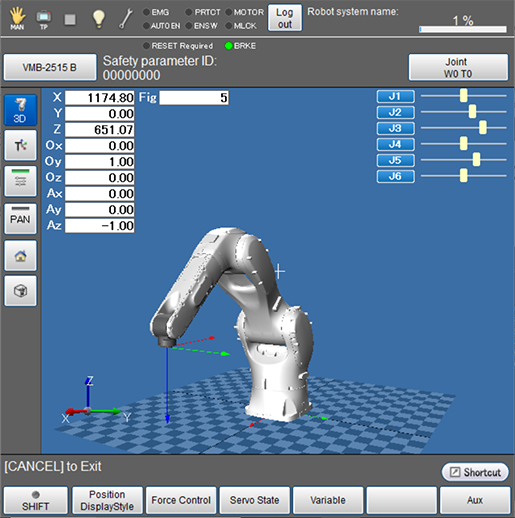
| Available function keys | |
|---|---|
| [F1 Position Display Style] |
Changes the displaying method for the information of the current robot position. Four types of displays, [P type display], [J type display], [T type display], and [No display] can be selected. Press the button to switch between them. |
| [F2 Force Control] | Displays the [Force Control] window. Check and set [Force Control Log] and [Sensor] |
| [F3 Servo State] |
Displays the state of the servo of each joint. Acquire control logs and servo logs, and display the estimated load factor for each joint. |
| [F4 Variable] | Displays [Variable screen]. |
| [F6 Aux] |
Displays the [Auxiliary Functions - Arm] window. Confirm and change the settings associated with arm. |
| [F7 Origin return] |
Displays the origin return guidance window. This menu is displayed after the license registration of the origin return guidance. This key is available only when the currently logged-in account is granted user permission for "Programming". |
| [F12 Maintenance] | Displays the menu associated with settings for each joint. |
| Keys other than function keys | |
|---|---|
 |
Displays 3D image of the robot during the machine lock. The 3D button turns blue while it is pressed. |
 |
Changes the displaying method for the information of the current robot position. Four types of displays, [P type display], [J type display], [T type display], and [No display] can be selected. Press the button to switch between them. |
 |
Displays position information of each joint in bar. Press button to switch between display and no display. |
 |
Change the moving method of the 3D image viewpoint. |
 |
Changes the 3D image viewpoint. Switches between default, front, up, right lateral and default every time the key is pressed. |
 |
Changes the 3D image viewpoint. Switches the view so that the entire robot can be observed. |
ID : 9689