
 HOME
HOME
ID : 9709
Changing the Arm Display Settings
Operation path : [F2 Arm] - [F6 Aux] - [F7 Display Settings]
Change the settings of the data displayed on the arm screen.
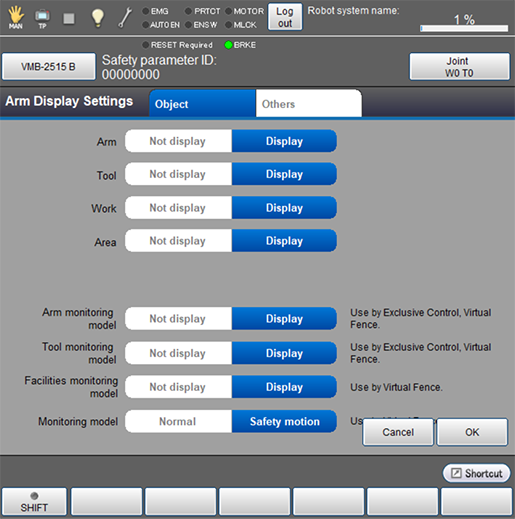
Press [F7 Display Settings] to display the following [Arm Display Settings] window.
For each item on each tab, select "Not display" or "Display", and then press [OK] to confirm.
[Object] Tab
With the machine locked, set the data which appears with the robot 3D view image on the arm screen.
[Other] Tab
You can select the option of the default current position and specify whether to display the destination position.
If [Motion Record] is selected, F5 changes to [Edit]. Numeric keypad will be displayed when [Edit] is pressed. Enter the number of motion records with numeric keypad, and press [OK] to change it.
Use [Display 3D on startup] to specify whether to display the 3D view on the arm screen on controller startup.

ID : 9709