
 HOME
HOME
ID : 10957
Display and Adjust the Base Setting
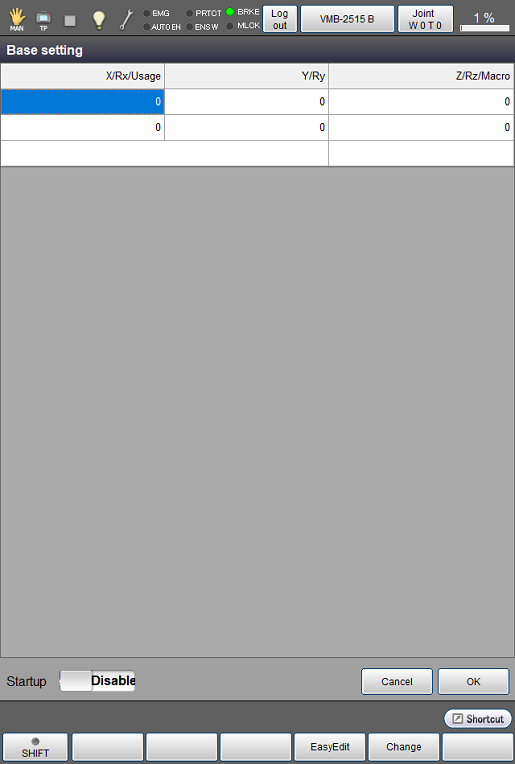
On the [Base setting] window, specify the robot base position relative to the origin of the world coordinate system.
The world coordinate system is a coordinate system based on the origin that you can specify.
By designating the origin of the world coordinate system as the origin of the facility coordinate system, you can specify the robot position on the facility coordinate system.
To use this function, you need to set the parameter [190: BASE number setting] to [1: Enable].
Operation path: Top screen - [F2 Arm] - [F6 Aux] - [F10 Base]
The [Base setting] window appears.
| Available function keys | |
|---|---|
| [F4 EasyEdit] (*) | Set the Base definition by performing three position teaching with a robot. |
| [F5 Change] (*) | Select a coordinate element you want to change, and then press [F5 Change] to display a numeric keypad. Enter a value with the numeric keypad, and then press [OK] on the numeric keypad. To confirm the change, press [OK] on the Base setting window. |
| Start up [Enable/Disable] (*) | Set whether the base setting is enabled/disabled at the startup. The new setting of "Startup = Enable" will not be effective until the controller reboots. |
- If you configure the base setting while using the virtual fence, you need to receive the base definition of the controller using WINCAPSIII and execute [Export virtual fence data] to transfer the data to the controller.
- (*) This key is available only when the currently logged-in account is granted user permission for "Programming".
To change the base coordinates that have been defined already, use ConvertPosBase command.
For details, refer to Example of ConvertPosBase.
ID : 10957
- Related Information
- Base Setting by using Easy Teaching