
 HOME
HOME
ID : 9737
Operation of I/O Bit Calculation Function
Operation path: [F4 I/O] - [Calculation] button on the I/O Monitor.
This screen appears only when the currently logged-in account is granted user permission for "Programming".
Tap [Calculation] button on the I/O Monitor to display the following [I/O Calculator] window.
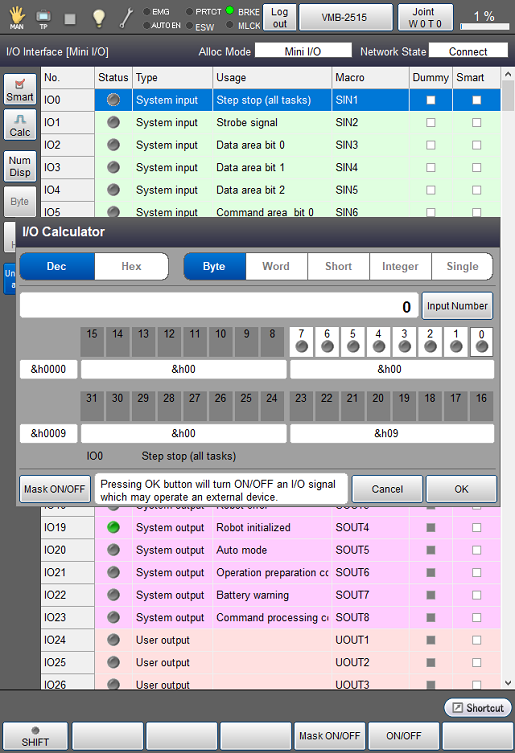
| Available function keys | |
|---|---|
| [F4 Mask ON/OFF] | Select the bit to set mask, and tap [Mask ON/OFF] to switch Mask on/off for the selected bit. |
| [F5 ON/OFF] | Switch on/off the I/O of selected bit. |
| [F11 Input Number] |
Display numeric keypad. Enter the bit calculation value with numeric keypad, and tap [OK] to set the bit corresponding to the entered value to on. |
| Keys other than function keys | |
|---|---|
| [Dec/Hex] | Switch between decimal and hexadecimal values to display the calculation results. |
| [Byte] | Perform bit calculation for 1 byte. |
| [Word] | Perform bit calculation for 2 byte. |
| [Short] | Perform bit calculation for 2 byte. (positive integer/negative integer) |
| [Integer] | Perform bit calculation (integer value) for 4 byte. |
| [Single] | Perform bit calculation (decimal number) for 4 byte. |
| [Input Number] | Display numeric keypad. Enter the bit calculation value with numeric keypad, and tap [OK] to set the bit corresponding to the entered value to on. |
| [Mask ON/OFF] | Select the bit to set mask, and tap [Mask ON/OFF] to switch Mask on/off for the selected bit. |
ID : 9737