
 HOME
HOME
ID : 9756
Panel Settings
Operation path: [F6 Setting] - [F3 Pendant and Panel] - [F3 Panel Settings]
Perform settings associated with panel display.
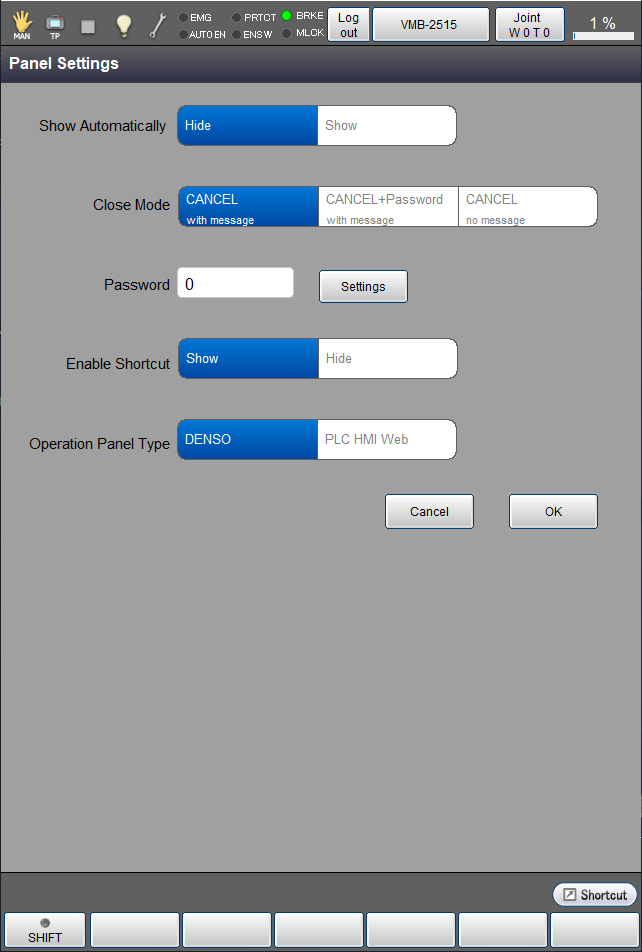
Tap [F3 Panel Settings] to display the following [Panel Settings] window.
The currently set item will be highlighted.
To change the setting, select the item to change by directly touching it, and Tap [OK] to confirm the changed setting.
To set password, tap [Settings] key to display numeric keypad. Then, enter the value to set as password with numeric keypad, and tap [OK] to set it.
In the RC9, the following two panels are available.
- DENSO : Panel that is equipped as standard
- PLC HMI Web : Panel that is provided by Beckhoff
The panel provided by Beckhoff (PLC HMI Web) is an paid option.
For details, see Software Options.
You can select which panel to use in [Operation Panel Type].
ID : 9756