
 HOME
HOME
ID : 9743
Displaying the Setting Menu
Operation path: Top screen - [F6 Setting]
Display the setting menu.
Press [F6 Setting] to display the following [Settings] window.
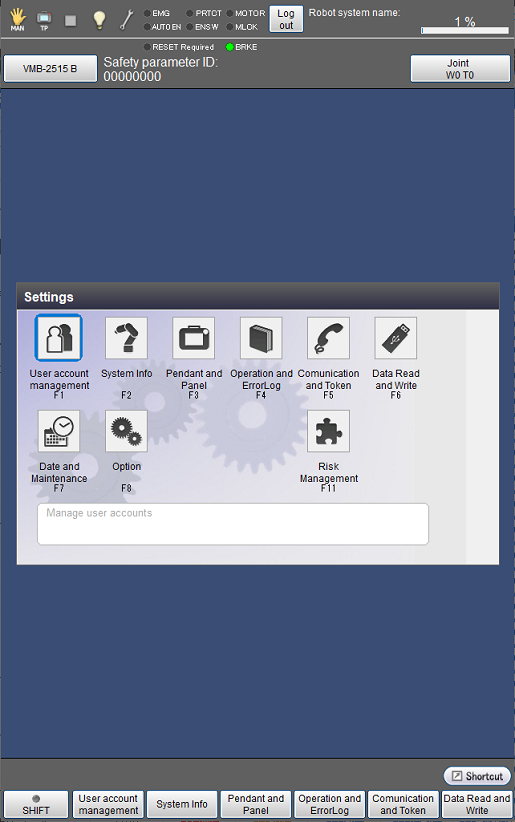
| Available function keys | |
|---|---|
| [F1 User account management] | Manage the user account. |
| [F2 System Info] | Display information of controller including software version and running time. |
| [F3 Pendant and Panel] | Perform settings associated with display including language and character size, and set the panel. |
| [F4 Operation and Error Log] | Display contents of operation and error logs. |
| [F5 Communication and Token] | Perform settings associated with communication including IP Address setting, and set the executable token. |
| [F6 Data Read and Write] | Read and write data to USB. |
| [F7 Date and Maintenance] | Set date and clock, and the next battery and robot maintenance dates. |
| [F8 Option] | Add optional functions. |
| [F11 Risk Management] | Configure the settings requiring risk assessment, such as the auto logout time and whether to reset a program when logging out. |
ID : 9743
- Related Information
- User Account Management
- Displaying System Information (General Tab)
- Displaying System Information (Robot Tab)
- Displaying System Information (Controller Tab)
- Displaying Setting Menu for Pendant and Panel
- Displaying Operation and Error Logs
- Displaying the Communication and Executable Token Menu
- Ping Execution
- Setting for Reading and Writing Data
- Displaying the Setting Menu for Date and Maintenance
- Displaying the Option Settings Menu
- Displaying the Risk Management Menu