
 HOME
HOME
ID : 9758
Displaying Operation and Error Logs
Operation path: [F6 Setting] - [F4 Operation and Error Log]
Display operation and error logs.
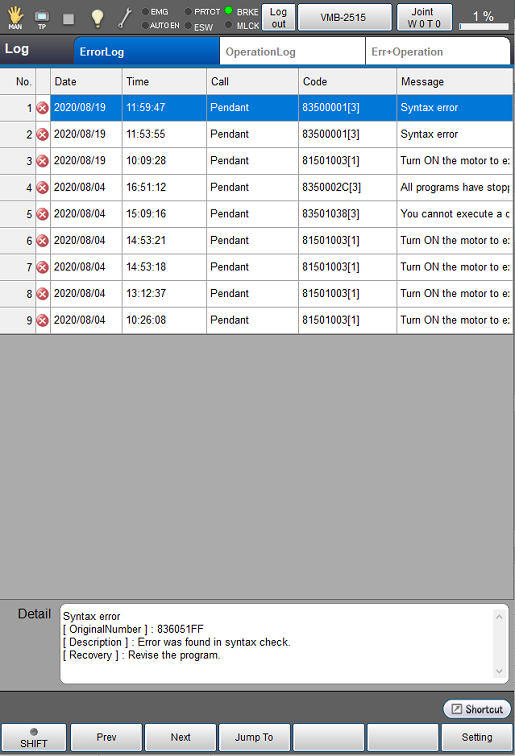
Press [F4 Operation and Error Log] to display the following [Log] window.
The contents of display can be switched by selecting tabs, [ErrorLog], [OperationLog], and [Err+Operation] in [Log] window.
| Available function keys | |
|---|---|
| [F1 Prev] | Display the previous page of the currently displayed log information. |
| [F2 Next] | Display the next page of the currently displayed log information. |
| [F3 Jump To] |
Displays numeric keypad. Enter the list No. of logs with numeric keypad, and tap [OK] to display the log of the target list No. |
| [F6 Setting] (*) |
Display [Record error level setting] window. Select error level to record as a log. Once pressed [OK], error log will be recorded at this set error level. |
| [F7 ClearLog] (*) |
Delete the registered log information. Select the log information to delete, and rap [OK] to delete the log. |
ID : 9758