
 HOME
HOME
ID : 10343
Connecting Method
Basic method
Whichever I/O option you connect, you need the EtherCAT coupler terminal.
There is the DIN rail for option inside the robot controller. Install the EtherCAT coupler terminal there.

After installing the EtherCAT coupler terminal, connect the EtherCAT cable and the backplane board power harness (single) to the EtherCAT coupler terminal as below.
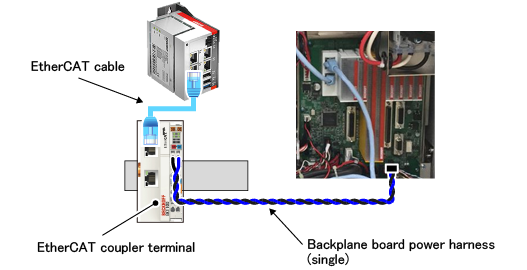
If the built-in option of the EtherCAT coupler terminal is specified when you order the robot, the robot will be shipped with the above connection completed.
After that, connect any I/O option to the right side of the EtherCAT coupler terminal. The following figure shows when connecting the EtherNet/IP slave terminal.
For cables connected to the EtherNet/IP slave terminal, pass them through the cable multi-outlet plate and pull out them from the robot controller.
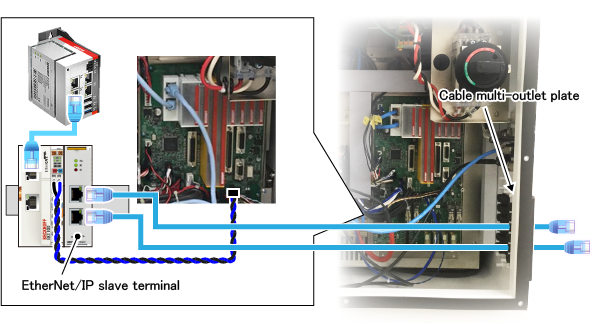
When options cannot be equipped to the robot controller
When the number of I/O options exceeds the available number to equip to the robot controller
The following figure shows when the digital input terminal and the digital output terminal cannot be equipped.
Prepare another EtherCAT coupler terminal for I/O options not available to equip, connect them as below.
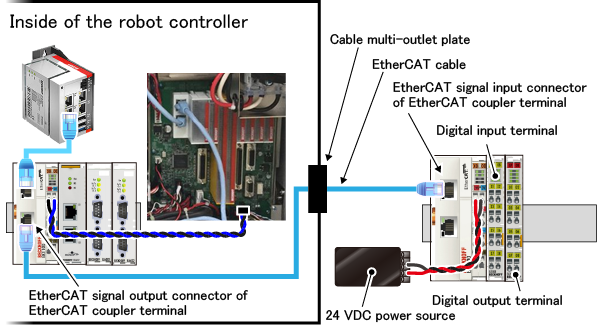
ID : 10343