
 HOME
HOME
ID : 10532
Precautions while Robot is Running
Touching the robot while it is in operation can lead to serious injury. Please ensure the following conditions are maintained and that the cautions listed from onwards are followed when any work is being performed.
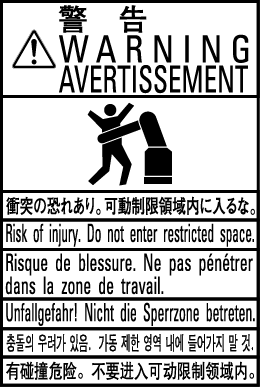
- Do not enter the robot's restricted space when the robot is in operation or when the motor power is on.
- As a precaution against malfunction, ensure that an emergency stop device is activated to cut the power to the robot motor upon entry into the robot's restricted space.
- When it is necessary to enter the robot's restricted space to perform teaching or maintenance work while the robot is running, ensure that the steps described in "Ensuring safety of workers performing jobs within the robot's restricted space" are taken.
A "work" as is defined in this section includes all operations such as transportation, installation, assembling the robot facilities, (electric wiring, mounting tool or end-effector, air piping) adjustment, anomalous correspondence procedure in case of abnormal situations, maintenance, cleaning.
Installing Protective Equipment
- The workers must wear protective gears (working clothes, safety shoes, safety glasses, hard hat and gloves) applicable to work.
- When treating grease, make sure to wear gloves and protective glasses to prevent the grease from adhering to skin and eyes.
Precautions for Transportation and Installation
- Use a crane or a fork lift with suitable capacity to perform the work in compliance with lows and regulations of each country and region.
- Wire must be fixed to the hoisting bolt (eye bolt). If other than the hoisting bolt is used, it may cause a serious damage.
- The workers must wear protective gear (hard hat, safety shoes, safety glasses, gloves).
- Do not stay under the robot during operation.
If you transport a robot and a robot controller in a way other than DENSO specified one, it may cause serious bodily injury or death by falling or tumbling down.
Creation of Working Regulations and Assuring Worker Adherence
When entering the robot's restricted space to perform teaching or maintenance inspections, set "working regulations" for the following items and ensure workers adhere to them.
- Operating procedures required to run the robot.
- Robot speed when performing teaching.
- Steps that must be taken by the worker in the event of a malfunction, according to the contents of the malfunction.
- The necessary steps for checking release and safety of the malfunction status, in order to restart the robot after robot movement has been stopped due to activation of the emergency stop device.
-
Apart from the above, any steps below necessary to prevent danger from unexpected robot movement or malfunction of the robot.
- Display of the control panel.
- Assuring the safety of workers performing jobs within the robot's restricted space.
- Maintaining worker position and stance. Position and stance that enables the worker to confirm normal robot operation and to take immediate refuge if a malfunction occurs.
- Implementation of measures for noise prevention
- Signaling methods for workers of related equipment
- Types of malfunctions and how to distinguish them
Please ensure "working regulations" are appropriate to the robot type, the place of installation and to the content of the work.
Be sure to consult the opinions of related workers, engineers at the equipment manufacturer and that of a labor safety consultant when creating these "working regulations".
Display of Operation Panel
To prevent anyone other than the worker from accessing the start switch or the changeover switch by accident during operation, display something to indicate it is in operation on the operation panel or smart TP. Take any other steps as appropriate, such as locking the cover.
Safety Installation and Operation of the Hand (end-effector)
- When you install or operate the hand (end-effector), make sure that power loss, changes of air or power supply do not cause hazardous conditions. Also, please be aware that residual energy might exist inside the device.
- Fix the hand (end-effector) firmly to prevent loosening.Also, check that it is not loose before performing the work.
- When using a electric gripper and workpiece, make sure that there is no danger according to shape, materials, operating temperature and others.
- For designing, creating, and mounting a gripper, refer to Setup. If it does not satisfy contents written in “Mounting a Tool”, the robot could cause damage to personnel or could damage the robot itself. In addition, the robot will be out-of-warranty.
Ensuring Safety of Workers Performing Jobs Within the Robot's Restricted Space
When performing jobs within the safety fence, place an overseer at the exit/entrance of the safety fence and monitor to prevent anyone other than workers from entering the safety fence.
When performing jobs within the robot's restricted space, take any of the following steps to ensure that robot operation can be stopped immediately upon a malfunction.
-
Ensure an overseer is placed in a position outside the robot's restricted space and one in which he/she can see all robot movements, and that he/she is devoted solely to that task.
- An emergency stop device should be activated immediately upon a malfunction.
- Do not permit anyone other than the worker engaged for that job to enter the robot's restricted space.
- Ensure a worker within the robot's restricted space carries the portable emergency stop switch so that he/she can press it (the emergency stop button on the smart TP or mini-pendant) immediately if it should be necessary to do so.
- Sufficient working space should be maintained to avoid containment or pinching between the robot and peripheral equipment.
Inspections Before Commencing Work Such as Teaching
Before starting work such as teaching, inspect the following items, carry out any repairs immediately upon detection of a malfunction and perform any other necessary measures.
Release of Residual Air Pressure
Before disassembling or replacing pneumatic parts, shut off the air supply and release any residual air pressure from the drive cylinder in advance.
Initial Test after Installation or Parts Replacement
After the installation, parts replacement, or the software version upgrade, perform the initial test.
Perform the following items for the initial test.
-
Check that all the safety-related functions work normally.
(Example: While a robot runs at low speed, press the emergency stop button on the smart TP, and then check that the robot stops.) - Check for any gap between the robot position displayed on the smart TP or mini pendant and the actual position of the robot.
- Check that the peripheral devices connected to the controller work properly.
- Check that all axes work normally in the manual operation.
Precautions for Test Runs
The worker should stay outside of the robot's restricted space when performing test runs.
Perform initial test and periodical check-up to confirm whether the protective measure is effective. Protective measure includes emergency stop switches, signals linked to the safety fence (Enable Auto signals, protective stop signals) and mechanical stoppers.
Precautions for Automatic Operation
-
When turned on
Before selecting the automatic mode, ensure that all safety protective functions are working. Stay outside of the safety fence when starting the robot. Before starting the robot, check the following items as well as setting the signals to be used and perform signaling practice with all related workers.- Check that there is no one inside the safeguarded space (with a safety fence).
- Check that the smart TP and tools are in their designated places.
- Check that no lamps indicating a malfunction on the robot or related equipment are lit.
- Check that the display lamp indicating automatic operation is lit during automatic operation.
-
Steps to be taken when a malfunction occurs
Stop the robot's operation by activating the emergency stop device when it is necessary to enter the safeguarded space with a safety fence to perform emergency maintenance in the case of malfunction of the robots or related equipment.
Take any necessary steps such as posting a notice on the start switch to indicate work is in progress to prevent anyone from accessing the robot.
Precaution for Power Switch
- Make sure to shutdown the power supply before installation, assembling (electrical wiring, mounting tool or end-effector, air piping), daily inspection, repair or parts replacement.
- A power switch of the controller is the second circuit breaker. Residual current exists inside of the controller after turn off the switch. In operation, be sure to disconnect the power connector or turn off the circuit breaker of the equipment to make sure that the power supply to the controller is shut off.
- Also, make sure to lockout to prevent turning on power supply by other workers.
Precautions in Cleaning
Make sure to turn off the power breaker of the equipment before cleaning of the robot, cables and other parts.
Safety Storage of Pendants
To prevent misuse, please store unused smart TP and mini-pendant in a controlled area.
Precautions in Repairs
- Do not perform repairs outside of the designated range.
- Under no circumstances should the interlock mechanism be removed.
- When opening the robot controller's cover for operation such as the battery replacement, always turn the robot controller off and disconnect the power cable.
- Use only spare tools specified in this manual.
Action During Emergencies and Malfunctions
- Decide in advance what action should be taken in case of emergency or abnormality, and train accordingly.
- In case of emergency or abnormality, for example, where someone is caught in the robot, use the brake release function of the smart TP or the mini pendant so that you can move the robot axes even when the motor is off.
For details, refer to "Brake Release Unit". - Use the brake release unit, which is an optional part, if neither the smart TP nor the mini pendant is available.
- Before releasing the brake, take necessary measures to eliminate an extra danger. For example, lift the robot by crane to prevent it from falling due to gravity or the weight of the axes.
- For how to release the brake, refer to the Setup sections for each robot model.
Mechanical Stoppers
When the robot has collided with a mechanical stopper, contact us for inspection and repairs before using the robot because the robot may be damaged.
ID : 10532