
 HOME
HOME
ID : 10761
Switching to Slave Control
Selecting Slave Control
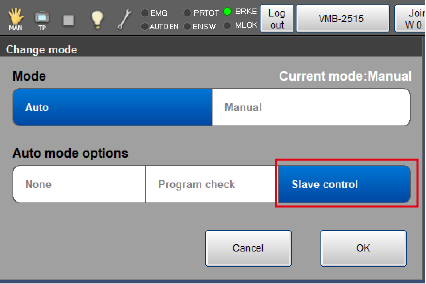
When switching to Auto mode, select [Slave control] of [Auto mode options] in the mode switching window.
Slave Control Setting
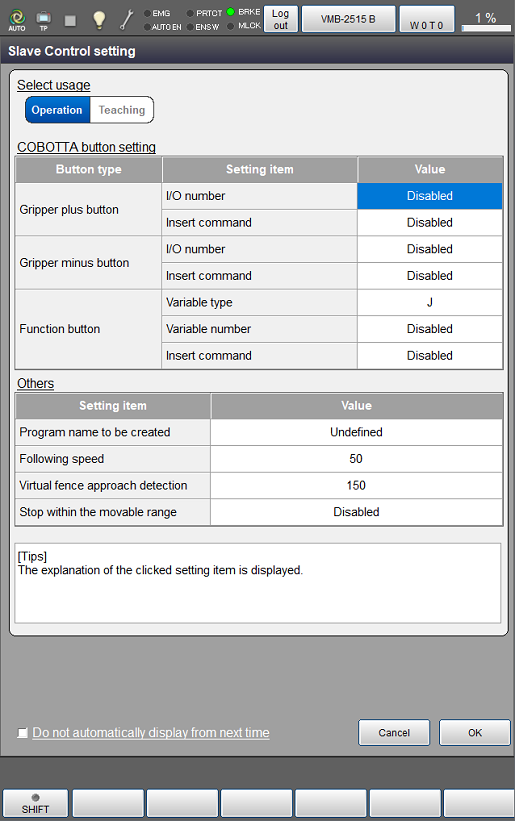
If you switch to Auto mode with selecting [Slave control] of [Auto mode options], the setting window of the following parameters will appear.
This parameter setting can also be displayed from [F6 Setting] - [F8 Option] - [F6 Slave control].
If you select the check box of [Do not automatically display from next time], the parameter setting window will not be displayed when switching the mode.
Select Usage
Select usage of the Mirror Control function.
| Parameter name | Description |
|---|---|
| Operation | Operate COBOTTA to move the slave robot. Reading the current position and automatically inserting commands are not executed. |
| Teaching | Operate COBOTTA to teach the slave robot. When pressing a button of COBOTTA, reading the current position and automatically inserting commands are executed according to setting. To insert a command, the program edit window must be displayed. |
COBOTTA Button Setting
| Parameter name | Default setting | Description | |
|---|---|---|---|
Gripper plus button |
I/O number | Disabled | Set the I/O number to switch ON/OFF when pressing the gripper plus button of COBOTTA. If "-1" is set, it is disabled. |
| Insert command | Disabled | Automatically insert a command according to setting when pressing the gripper plus button of COBOTTA. | |
| Gripper minus button | I/O number | Disabled | Set the I/O number to switch ON/OFF when pressing the gripper minus button of COBOTTA. If "-1" is set, it is disabled. |
| Insert command | Disabled | Automatically insert a command according to setting when pressing the gripper minus button of COBOTTA. | |
| Function button | Variable type | J | Set the variable type to record the current position when pressing the function button of COBOTTA. The following three types of variables can be recorded.
|
| Variable number | Disabled | Set the variable number to record the current position when pressing the function button of COBOTTA. If "-1" is set, it is disabled. | |
| Insert command | Disabled | Automatically insert a command according to setting when pressing the function button of COBOTTA. | |
Others
| Parameter name | Default setting | Description |
|---|---|---|
| Program name to be created | Undefined | Specify a program name to be created newly. It is created with the program template for the Mirror Control. When you set a program name and press [OK] in the slave control window, it automatically goes to the program edit window. |
| Following speed (*1) | 100 | Set the motion speed when the slave robot follows the master robot. If the following speed is low, the slave robot motion may be unstable and may not be able to follow normally. |
| Virtual fence detection [mm] | 150 | Specify the distance within which the slave robot detects the virtual fence. |
| Stop within the movable range (*2) | Disabled | Enabling this function will cause the slave robot to stop before contacting the virtual fence. |
*1: Even if you change the value of this parameter while connecting with COBOTTA, the setting will not be reflected. It will be reflected at the time of reconnection with COBOTTA.
*2: After stopping before the virtual fence due to this function, the slave robot will resume the follow-up operation at a time when COBOTTA is moved to the position where the slave robot would not contact the virtual fence.
Slave Control Output I/O Number
In the [Arm] auxiliary function - [Config] menu, set it there.
For operation, please refer to "Displaying and Setting the Configuration" in Smart TP Operation Guide.
| No. | Parameter name | Default setting | Description |
|---|---|---|---|
| 284 | Slave Control output I/O number | -1 | If the license of the Mirror Control function is enabled, turn on the I/O specified by this parameter at start-up. If "-1" is set, it is disabled. |
ID : 10761