
 HOME
HOME
ID : 10773
Setup (5 Degree Operation Confirmation) with Smart TP
After CALSET is completed, check the robot operation to check whether VL initial setting data received by the robot controller is correct.
Check whether each joint can be moved 5 degree or more by the manual operation.
Perform by following the procedure below.
1
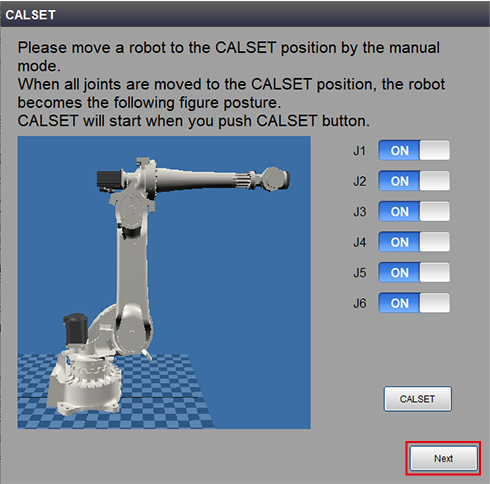
After CALSET is completed, it returns to the CALSET window.
Press [Next].
3
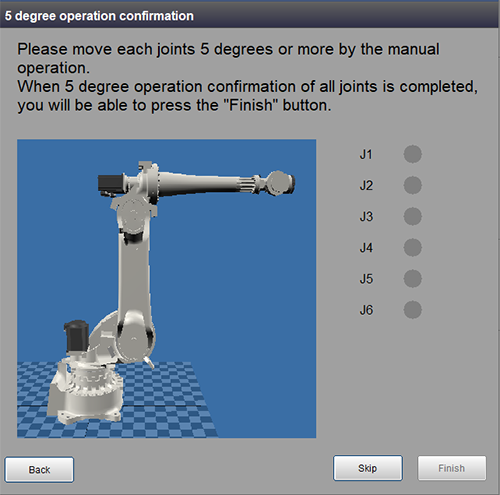
The window to check the joint that the operation confirmation is completed appears. When this window is displayed, move each robot joint by the manual operation.
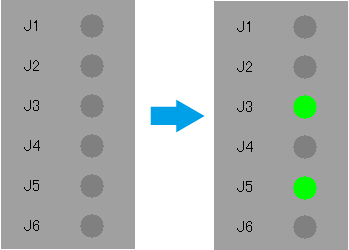
For the joint that the operation of 5 degrees or more is completed, the lamp color changes from gray to green.
You cannot press the [Finish] button until all joint lamps turn green.
If Excessive position error occurs frequently during the manual operation, please contact our service representatives.
4
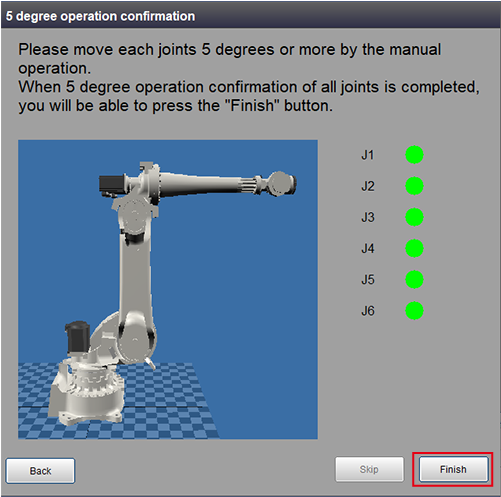
When the operation confirmation of all joints is completed, the [Finish] button will be enabled in the window.
5
Press [Finish].
This completes VLA setup. You can move VLA series robot.
After setup is completed, move to the CALSET position again by the manual operation and confirm visually that the movable reference notch coincides with the fixed reference notch on each axis.
If they are deviated, send VL initial setting data and perform the setup again.
If they are still deviated, refer to "CALSET Operation” and execute CALSET.
ID : 10773